The loyalty program is available for all ThunderTix users and, once created, is enabled for all events. ThunderTix allows you to reward customers for frequent purchases or when they have reached a certain threshold level of dollars spent with your business. Increase customer retention and loyalty by rewarding them with an e-gift card or coupon!
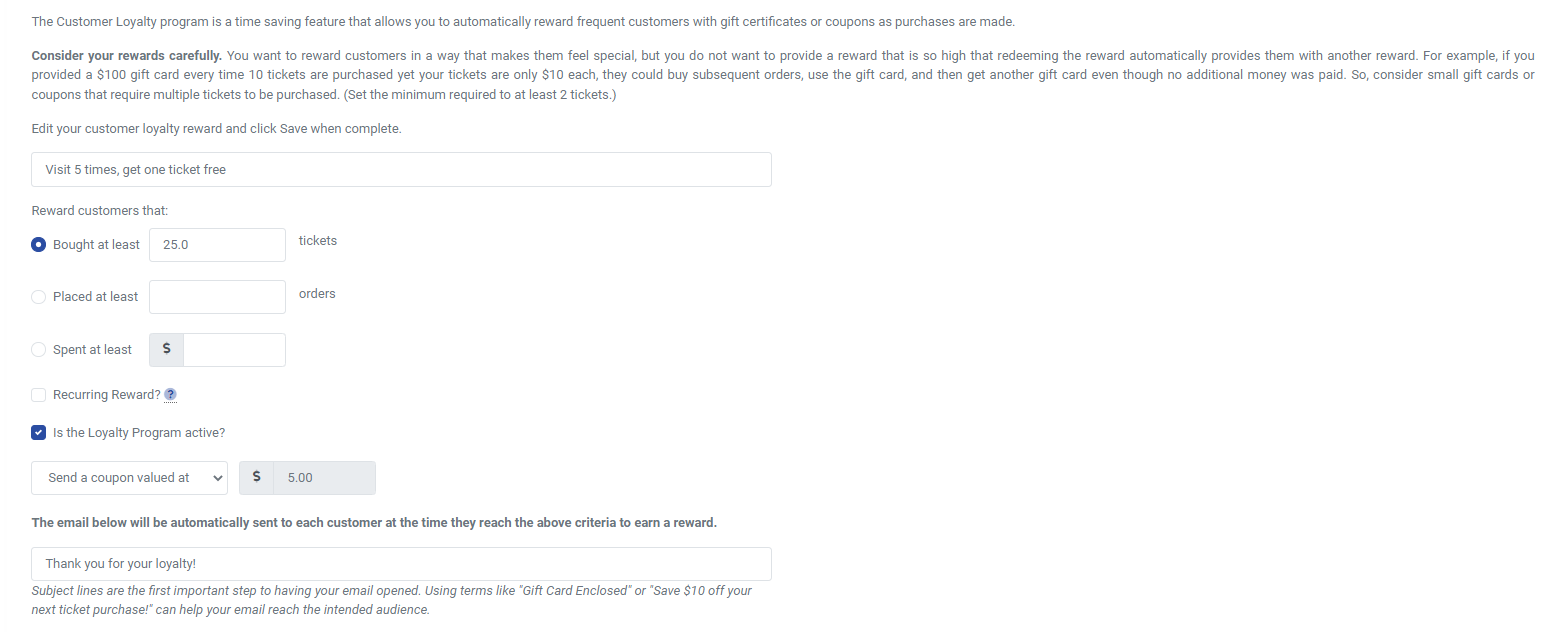
As a logged-in user, you can create your customer loyalty program under the Revenue Builders tab. Customize the name of the award your customers will see. Choose whether you want to reward customers by the total number of tickets purchased, by the number of orders, or by the total amount spent with your organization. image.png90.7 KB
You have the option to make the rewards recurring or a single reward. So, if the customer meets the threshold you set, and they receive a reward, if they meet the threshold again in the future, they would receive an additional reward, and so on.
Customize the email that will automatically be sent out to patrons when they achieve a reward. Start by creating a catchy subject line, an important step to having your email opened. Using terms like "Gift Card Enclosed" or "Save $10 off your next ticket purchase!" can help your email reach the intended audience. Ensure the actual contents of your email include information about how the reward can be used. You can style the email fully with HTML. We’ve included a space for the coupon or gift card code to be inserted into the email, so make sure you don’t remove that. You’ll see it like this: {coupon_code} or {gift_card_code}. When the email is sent, we’ll automatically send a unique coupon or gift card code specific to that customer. However, if you want to use the Loyalty program to simply trigger an email that you customize without either code, you can craft the email contents for other rewards aside from coupons and gift cards. Clicking on the ticket person icon above the content area will insert the code again in case you remove it. The person icon inserts the code needed for the patron’s name. Want to see what the email will really look like when received? Click on “Send Test Email” to receive an example email to test the display of the contents or any HTML formatting entered. Once you are satisfied, be sure to click save!
The Loyalty Program Program is included with all plans at no additional charge, so get started today!