
Support Forum
How do I find links to my events, packages, and products? - Thu - Nov 13, 2025 - 5:36pm
-
 You can easily find the links to all of your events, performances, packages, and product in our link builder!
First, go to the menu at the top right of your screen. Click on the "Public Display Settings" tab and then on the "Link Builder" option in the drop down menu.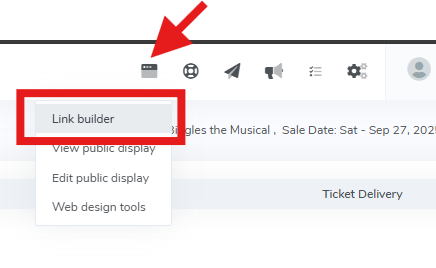
This will bring you into our public display link builder page. Here, you can select "Link", click on the type of link you would like to display, and search for any events, performances, products or packages!
Simply click "copy code", and you have your link!


View our video tutorials
Do my ThunderTix event links and pages have static URLs?
How would I add our new event page to our website so that people can easily buy tickets?
How will Thundertix work if we get a new website design?
Set the the iframe height automatically to eliminate scroll bars
How can we create a ThunderTix ticketing page that lists all the show dates available? Currently, it’s only linking to one event.
Can the ThunderTix events page be styled to look like our site?
How can I use a calendar with all events available showing together?
