
Support Forum
How can I hide the “Pick more dates” button from my Build Your Own Package? - Tue - Aug 24, 2021 - 11:53am
-
Build Your Own packages allow patrons to receive a discount when they purchase a minimum number of events (defined in the setup of your pick-any package). They also have the option to select more than the minimum of events required. If they do, the discount will be applied to all events selected from the package. Here is what the "Pick More Dates" button looks like on a Build Your Own Package:
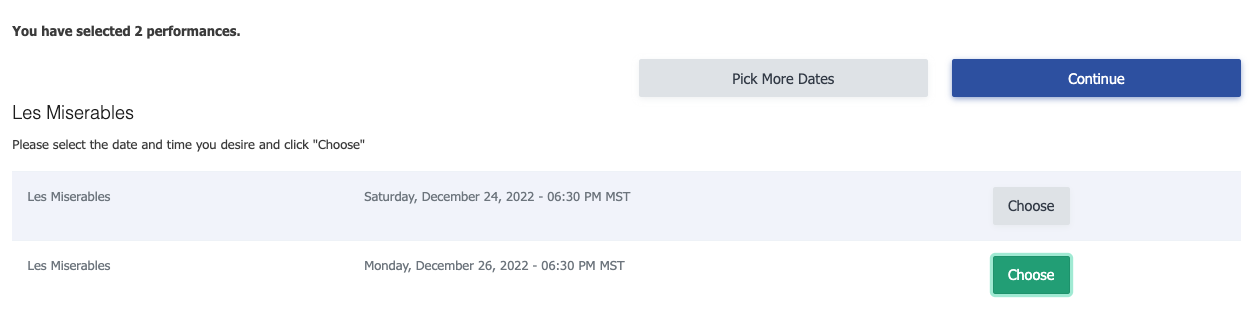
If you want patrons to pick exactly X performances, you have the option to hide the "Pick more dates" button that appears once they've selected the minimum events required.
To hide the "Pick more dates" button:- Head to Public Display Settings in the top menu bar and click on Fonts and CSS Styles
- Under Custom CSS Styles, add the following code:
#pick_more_dates {
  display: none;
}
3. Click Update to save your changes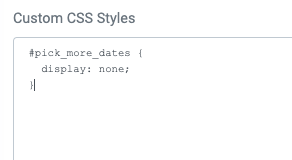
View our video tutorials
Where can I post a refund policy? (Terms and Conditions)
How can I change the address and phone number on the Ticket, thermal ticket and email?
Can I remove the billing address so our customer can skip it?
Can I add links to my Purchase Terms/Conditions
Getting Started with ThunderTix - A How To Guide
Can I add multiple tax rates?
How do I hide my event website from search engines?
