
Support Forum
How can I capture the customer phone/address on orders? - Sat - Oct 30, 2021 - 1:16pm
-
In the account settings, you can determine which fields you want to display for all customers that process orders. The data options available for the checkout page are: Phone number, Company name, Billing Address, and Shipping Address. These settings will be applied for every order processed.
- Head to Account Settings >> Click Checkout Options
- From the Checkout Page Fields tab, under REQUESTED INFORMATION AT CHECKOUT disable or enable the fields you wish to require on your public checkout page
All options listed as "Show" will be collected during checkout. If you do not want to collect some customer data -- like a shipping address, change the setting to "Hide".
When logged in as a ThunderTix user, there are no fields that are required. All billing information can be completely bypassed to make order processing faster.Required FieldsThe Phone or Billing address fields are required fields. When you set them to "Show", we will require that the information be captured during the checkout.
Optional Fields
If the Company name or Shipping address are set to "Show", they will be shown but optional. Customers will not be required to complete the fields in order to checkout.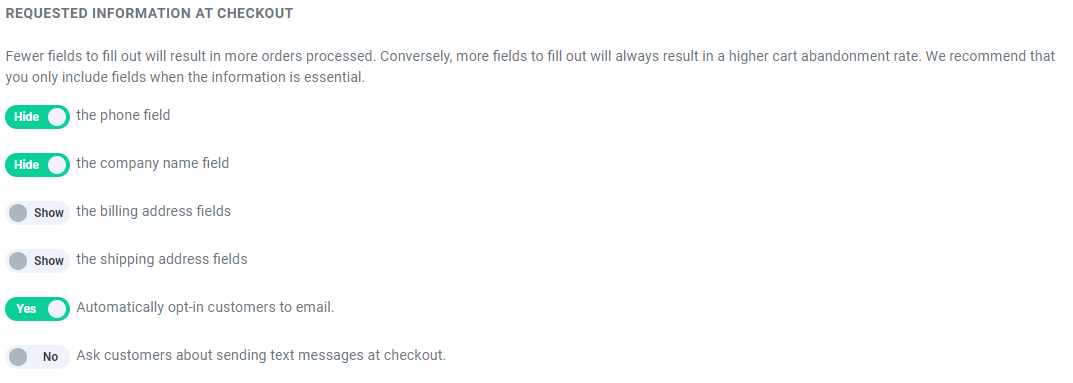
Box office Orders
If you want to require more fields for orders processed in the box office, you can further choose which fields you want required for your box office staff. None of the fields below are required for box office orders so that orders can be processed as quickly as possible on the night of an event. The fewer fields that are required, the faster an order can be processed. However, if your policy is to collect any of the fields below at all times, you do have the option to make them required as needed.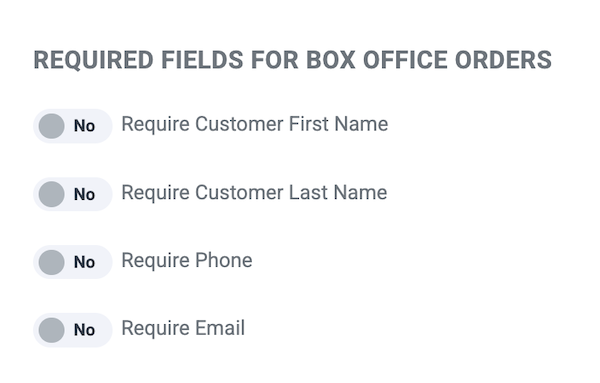

View our video tutorials
Where can I post a refund policy? (Terms and Conditions)
How can I change the address and phone number on the Ticket, thermal ticket and email?
Can I remove the billing address so our customer can skip it?
Can I add links to my Purchase Terms/Conditions
Getting Started with ThunderTix - A How To Guide
Can I add multiple tax rates?
How do I hide my event website from search engines?
