
Support Forum
Can I include a shipping label with my thermal ticket orders? - Mon - Feb 5, 2024 - 4:37pm

You have the option to include a shipping/mailing label with your thermal ticket orders. To enable this option, please take the following steps:
1. Head to the Templates Tab on your left hand menu >> Thermal ticket.
2. Scroll down to Shipping label and receipt >> switch the "Would you like to include a shipping label with a receipt?" toggle to "Yes."
3. Be sure to click the "Update" button.
Once you enable this, you'll see it with each set of tickets you print. We can move the shipping address and receipt portion anywhere on the ticket once it's enabled so that it fits perfectly in your window envelope.
1. Head to the Templates Tab on your left hand menu >> Thermal ticket.
2. Scroll down to Shipping label and receipt >> switch the "Would you like to include a shipping label with a receipt?" toggle to "Yes."
3. Be sure to click the "Update" button.
Once you enable this, you'll see it with each set of tickets you print. We can move the shipping address and receipt portion anywhere on the ticket once it's enabled so that it fits perfectly in your window envelope.
Ticket Envelopes
Our thermal ticket printing options work well with “windowed” ticket envelopes. These special envelopes are custom made with a small compartment inside to fit tickets safely and securely.
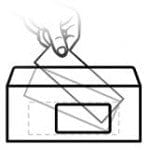
For walk-up redemption of paper tickets (will call, special VIP tickets held in reserves, etc.) the ticket envelopes help efficiency in busy box offices. With the printed tickets placed inside, the customer's name shows through the window, making them easy to find within a tall stack.
The see-through window serves a second purpose if you send tickets to customers via postal mail. The custom ticket template can be configured to print the buyer’s home address on a separate ticket-turned-label, and that address will show through the ticket envelope window eliminating the need to print the address manually.
For further information on Thermal Ticket printing, please see our Thermal Ticket Printing How-To Guide.
For further information on Thermal Ticket printing, please see our Thermal Ticket Printing How-To Guide.
View our video tutorials
How do I print tickets for someone who already received their PDF ticket but forgot to bring them?
How do I center the Short Message displayed on the pdf ticket?
How do I set up my thermal ticket printer?
Options for printing event tickets from the Guest List
Can ThunderTix process orders of 300 tickets at once?
We had a typo in our event spelling which has now been changed but it doesn't reflect on the ticket.
Different Venues in One Season
