After a whirlwind of implementing feature requests for March Madness 2024, we are excited to announce some new features for the Reconciliation Report!
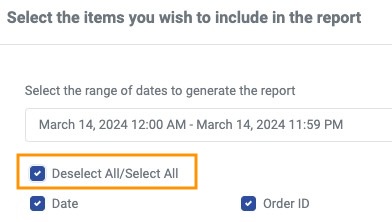
One of our new features, is we now offer the option to Select/Deselect the items included in your report. When you go to run the Reconciliation Report, this pop up will appear:
Select Deselct.jpg 21.8 KB You can select/deselect all options to make report generation even easier. We also save your selections for the next time you run the report!
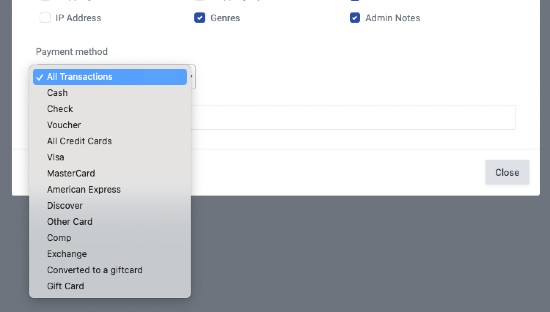
In addition to this, we have also added in the option to select the payment method for your Reconciliation Report. At the bottom of the pop up there will be a 'Payment Method' option with a drop down menu to select the payment method you would like to see the Reconciliation Report for. We will also save the selections for the next time you run a Reconciliation Report!
We have also added in three new columns to the Reconciliation Report:
Performance Name
Performance Date MM/DD/YYYY
Performance Time
We kept the existing Performance Name with date/time for those that prefer everything in a single column.