
Category: Reports

Please submit a support request to apply to be approved to try out the new beta version of the ThunderTix MCP connector.
Once we let you know you are approved, you'll take a few steps to get connected and begin exploring your data.
To add ThunderTix as a connector in Claude:
1 Op
... (continued)
Once we let you know you are approved, you'll take a few steps to get connected and begin exploring your data.
To add ThunderTix as a connector in Claude:
1 Op

Accounting Codes in ThunderTix
What Are Accounting Codes?
Accounting Codes — sometimes referred to as GL (General Ledger) codes — are a way for your organization to categorize every type of revenue, expense, and liability that flows through your ThunderTix account. Instead of seeing one
... (continued)
Many arts organizations apply for grants that require reporting how many patrons they serve in each county. Funders like state arts councils, community foundations, and the NEA often ask for this data to understand your organization's geographic reach.
The good news: you don't need to
... (continued)

You can now pull detailed sales reports for your add-on products (merchandise, food & beverage, upgrades, etc.) directly through the ThunderTix MCP. Previously, product sales data was only available as aggregated totals — now you can see a full breakdown per product.
What can I see in
... (continued)
What can I see in

To exclude refunded or exchanged tickets from a Ticket Type report please follow the instructions below:
- Head to Events > Event Manager > Click on the name of your event > Reports > Ticket Type
- Select/deselect the information you wish to include in your report
- Click the 'Hide refunded/ex
The Patron Database allows you to generate a report showing how many first-time guests purchased tickets in a given time period.
Further, if you wanted to know how many people came from outside of Colorado last year, you could run a report that shows X number of people came from Kansa
... (continued)
Further, if you wanted to know how many people came from outside of Colorado last year, you could run a report that shows X number of people came from Kansa
You can now build highly targeted mailing lists using a patron’s full purchase and spending history—without needing to run multiple reports or manually remove duplicates.
Using the Patron Database Search, you can combine criteria to answer questions like:
- Who has purchased tickets wit
ThunderTix actually has two separate locations where a user can export a guest list, and only one of them includes the refunded/exchanged filter:
1. Event → Reports Column → “Export Guest List”
- Quick export
-
Does NOT include the option to hide refunded/exchanged seats
2. Event → Reports Co
We provide two different Settlement Reports: one is available from the Event Manager for each event and includes data across all Dates & Times (performances) across that event. Then for each Date & Time, we have a Settlement Report dedicated to that particular show time.
The report c
... (continued)
The report c

If you use Authorize.net as your payment gateway, you can specify your preferred "transaction cut-off time".
- Login to your Authorize.net account
- Under "Account" in the left menu, click "Settings.
- On the right side of the page, under Business Settings, click "Time Zone" to ensure you ha
Treasurers often need to allocate incoming funds, fees, etc. to each show as they are happening. They will be able to see transactions in the payment gateway need to connect those transactions to the orders and events. The reconciliation report was created for bookkeepers and treasu
... (continued)
The information you need is in the Reconciliation Report.
- Head to Reports > Reconciliation
- Adjust the date fields.
By default, we load the last 24 hours, but you can download up to one month at a time. However, there's no time limit on data, so you can go as far back in the transactio

In order to find the number of packages that have been sold for a particular event, you'll want to download a Settlement Report for that event. Follow these steps to do so:
1. From your Event Manager page, find the event you are wanting the report for.
2. In the Reports column on the ri
... (continued)
1. From your Event Manager page, find the event you are wanting the report for.
2. In the Reports column on the ri
All reports are available and downloadable at any time either from an event or from the Reports tab.
Currently, we have only two automated emails that can be sent to users nightly.
One is a daily summary of all transactions that occurred the previous day, but the email will only be s
... (continued)
Currently, we have only two automated emails that can be sent to users nightly.
One is a daily summary of all transactions that occurred the previous day, but the email will only be s
Export the event sales report to see details and pricing for each ticket sold. This report will include information on price overrides and discounts per ticket sold along with the administrative comment entered on the order as the reason the discount was given.
- Head to: Events > Event
Every event includes an automatically compiled list of all attendees (guest list) sorted alphabetically by last name.
On-screen Guest List
On-screen Guest List
- Head to Events > Event Manager
- Click on the name of your event
- Under the Reports column, click on the guest list icon.
This is an on-screen attendee
All reports are available and downloadable at any time either from an event or from the Reports tab.
Currently, we have only two automated emails that can be sent to users nightly.
One is a daily summary of all transactions that occurred the previous day, but the email will only be s
... (continued)
Currently, we have only two automated emails that can be sent to users nightly.
One is a daily summary of all transactions that occurred the previous day, but the email will only be s
You will see the following reports: Guest List, Settlement Report, Guest List Export, Sales Report Export, Coupon Export, Barcode Export, Ticket Type Export, Survey Answers, Product SalesPlease follow the steps below to view or download any of the above reports.
- Head to: Events > Even
To download all email addresses for an event, take the following steps:
- Head to: Events > Event Manager
- Click on the name of your event
- From the 'Dates/Times' page, find the appropriate listing.
- Under the Reports column, click on the checkmark icon to export the Guest List
- You'll he
At times, you may want to show an event report that shows only the number of tickets sold, price and gross of tickets sold. If you're sharing this report with a third-party, you may not want to include fees collected, shipping costs, refunds, or discounts. These values can be excluded
... (continued)
All events -- even those that have expired -- are saved in your administrative portal. All reports for expired events and performances are also always accessible.
To see reports for a fully expired event:
To see reports for a fully expired event:
- Head to Events > Event Manager
- Click 'Show Expired Events'
- Click on the name of t
We provide an automatically compiled report of all barcode scans in a few ways. The guest list provides an up to the minute count of barcodes scanned and how many are remaining. The export is a CSV of all alpha-numeric barcodes for each performance. Finally, the Barcode Scan report pr
... (continued)
If you created a flex pass, you'd be able to see both redeemed and unredeemed coupon codes for that flex pass. This is also known as an auto-generated flex pass redemption report.
Unredeemed Flex Pass Voucher Report
To see unredeemed voucher codes, please do the following:
Unredeemed Flex Pass Voucher Report
To see unredeemed voucher codes, please do the following:
- Head to Event


On the Guest List, the comments will show next to the Order number. There will be a solid blue speech bubble for the customer comments and an outlined version of the speech bubble for admin comments. You just need to hover over the speech bubble to read the comment.
Survey results col
... (continued)
Survey results col
There are a few places to see product sales data.
All Products by Event:
- Head to Events > Event Manager
- Click Manage
- Under the Reports column, there is an icon labeled "P" for Product sales. Click the P icon to download a list of all products sold per performance.
Sales Report per Event
- Hea
Yes! We now offer a way to see how many barcodes were scanned over multiple days.
Head to Reports > Barcodes Scanned Report. You will see that we now have the option to select a range of performance dates rather than s single date.
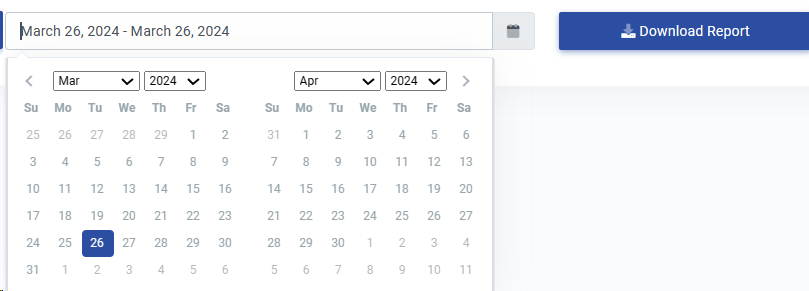
Simply enter in the date range you'd like to see all
... (continued)
Head to Reports > Barcodes Scanned Report. You will see that we now have the option to select a range of performance dates rather than s single date.
Simply enter in the date range you'd like to see all
After a whirlwind of implementing feature requests for March Madness 2024, we are excited to announce some new features for the Reconciliation Report!
One of our new features, is we now offer the option to Select/Deselect the items included in your report. When you go to run the Recon
... (continued)
One of our new features, is we now offer the option to Select/Deselect the items included in your report. When you go to run the Recon
Does your organization like to send out postcards or mail reminders for upcoming events throughout the season? You can now generate a postal mailing list!
To generate the list head to Patron Database > Search and Mass Mail. There will be two toggles on the right. Click on the 'All Cu
... (continued)
To generate the list head to Patron Database > Search and Mass Mail. There will be two toggles on the right. Click on the 'All Cu
Yes! We now offer a weekly report that breaks out the tickets sold for each individual event and includes a breakdown of each event by payment method.
Head to: Account Settings > Email Notifications > Alerts.
Head to: Account Settings > Email Notifications > Alerts.
- From the left menu, select 'When weekly totals are summarized by event' as s
