
Support Forum
Accounting Code Distribution Export Guide - Tue - Jun 23, 2026 - 2:10pm
-

Overview
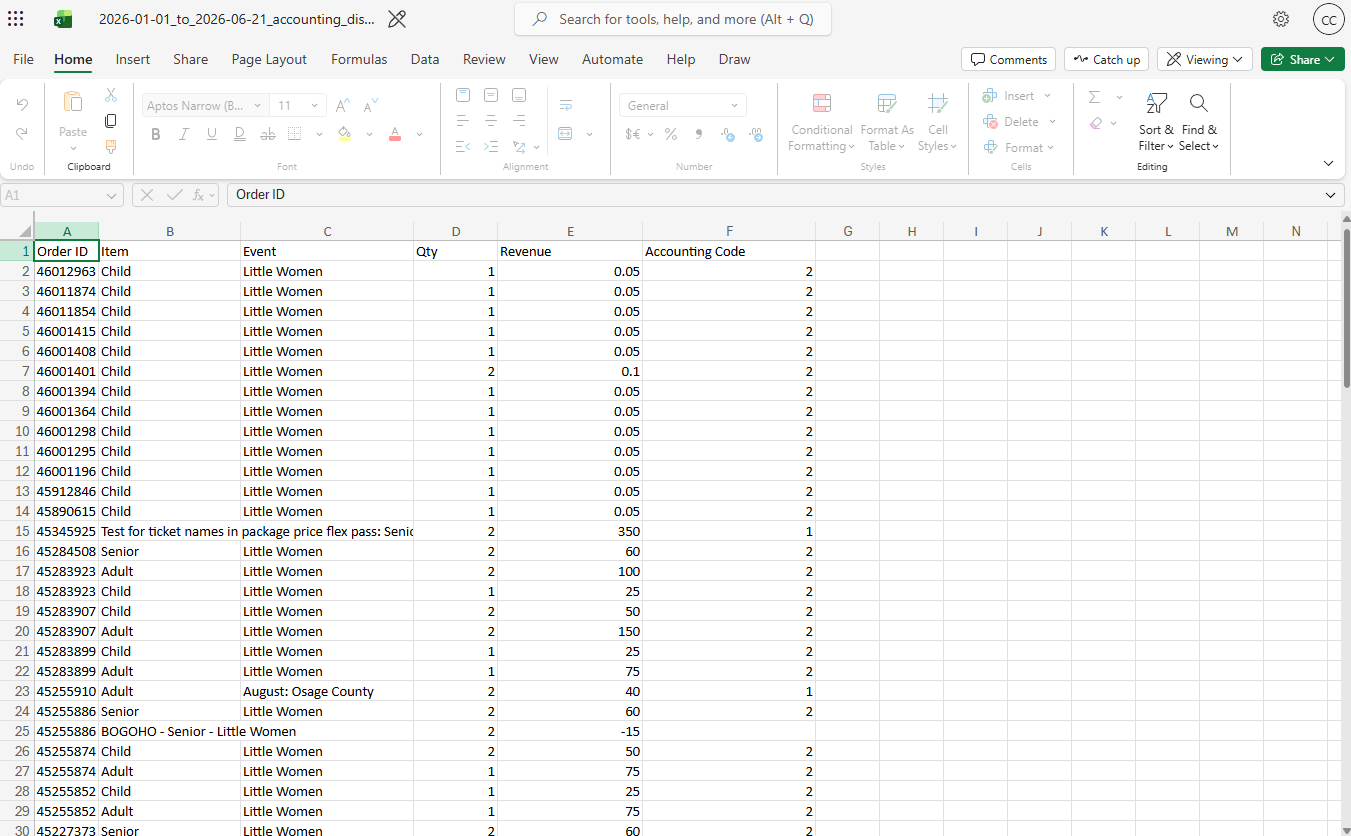
The Accounting Distribution Export produces a CSV file that breaks down paid order revenue into individual line items, each tagged with an Accounting Code. It is designed for finance and bookkeeping workflows, allowing venues to classify revenue into accounting categories and export data for use in accounting software.
Unlike the Reconciliation Report, which summarizes revenue at the order level, the Accounting Distribution Export distributes each order into its individual financial components, such as ticket sales, donations, products, fees, taxes, gift cards, and refunds. This provides a detailed view of where revenue originated while maintaining the same overall financial totals as the Reconciliation Report.
The export runs in the background. When it finishes, the file appears under Reports → Downloads.Background
Many organizations use accounting software such as QuickBooks, FreshBooks, Xero, Sage, or other General Ledger (GL) systems to track revenue and liabilities.
These systems rely on Accounting Codes to categorize financial activity into specific buckets, such as:- Ticket revenue
- Package revenue
- Membership revenue
- Donations
- Product and concession sales
- Ticket fees
- Shipping fees
- Sales tax
- Gift card liabilities
- Refunds
The Accounting Codes feature allows venues to define these categories within ThunderTix and map revenue types to the Accounting Codes used by their accounting system.
The Accounting Distribution Export is the first step toward future accounting integrations. By assigning Accounting Codes to revenue activity, ThunderTix can generate exports that are structured similarly to the data required by accounting platforms. This foundation will support future integrations that automatically transfer financial data into external accounting systems.How Accounting Codes Work
Each Accounting Code represents a revenue, liability, asset, or financial category used by the venue's accounting system.
Examples:
Accounting Code Description- 4001 Event Revenue
- 4101 Product & Concession Revenue
- 7600 Donations
- 2001 Sales Tax
- 7690 Gift Card Liability
- 7695 Gift Card Refunds
Venues assign Accounting Codes to revenue categories through the Accounting Code Mapping page.
Examples of revenue categories include:- Event ticket sales
- Package sales
- Membership sales
- Product sales
- Donations
- Ticket fees
- Shipping fees
- Tax
- Gift card sales
- Refunds
When an export is generated, ThunderTix evaluates each revenue line item and assigns the appropriate Accounting Code based on the venue's configured mappings.Accounting Code Overrides
Default Accounting Code mappings allow venues to assign a single Accounting Code to an entire revenue category.
For example:- All ticket sales may be assigned to Accounting Code 4001.
- All donations may be assigned to Accounting Code 7600.
- All products may be assigned to Accounting Code 4101.
However, many organizations require more granular tracking for specific events, products, or fundraising campaigns.
Accounting Code Overrides allow individual entities to use a different Accounting Code than the category default.
Examples:- All ticket sales use Accounting Code 4001 – Event Revenue.
- A specific educational event uses Accounting Code 4010 – Education Revenue.
- All donations use Accounting Code 7600 – Donations.
- A specific fundraising campaign uses Accounting Code 7611 – Capital Campaign Donations.
- All products use Accounting Code 4101 – Products & Concessions.
- A specific merchandise item uses Accounting Code 4110 – Merchandise Revenue.
Overrides provide flexibility while allowing venues to maintain simple default mappings for most revenue categories.Where to Find It
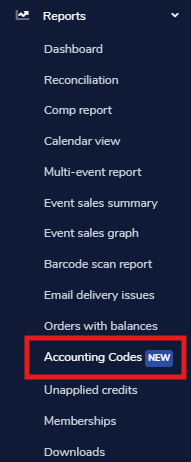
Reports → Accounting Codes → Accounting Distribution ExportPrerequisites
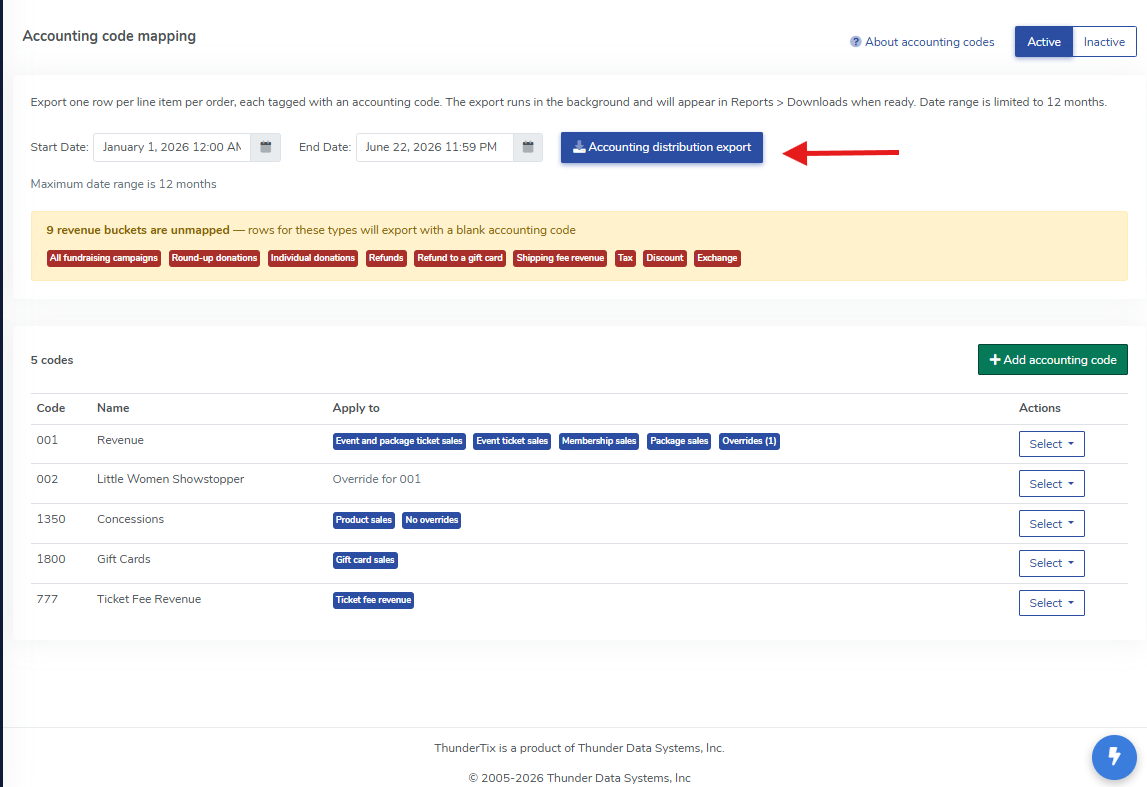
Before generating an export:- At least one active accounting code mapping must exist for the venue.
- If none are configured, the export button is disabled and a warning is shown.
- Accounting codes should be mapped for all revenue categories the venue uses:
- Ticket sales
- Donations
- Products
- Fees
- Tax
- Refunds
- Etc.
Unmapped categories produce rows with a blank Accounting Code column.The page displays a warning listing any unmapped revenue buckets before export (for example, "Tax" or "Product sales").How to Run an Export
- Choose a Start Date and End Date.
- Default range: yesterday (start of day through end of day), in the venue's time zone.
- Maximum range: 12 months.
- End date must be on or after the start date.
- Click Accounting Distribution Export.
- A confirmation message appears:
- "We are exporting your data now. The download button will appear shortly."
- Wait for the export to finish.
- Go to Reports → Downloads and open the CSV file.
Note: Only one export of this type can run at a time per user. If another export is already processing, wait a few minutes and try again.What Data Is Included
Scope- Includes paid orders whose financial activity falls within the selected date range.
- Uses the same order scope as the Reconciliation Report (based on money transactions for the account).
- For accounts with multiple venues, the export includes orders from all venues in the account, not just the venue shown in the UI. Each row uses the accounting code mappings for that order's venue.
One Row Per Line ItemEach CSV row represents a revenue line on an order, such as:- Ticket sales
- Season ticket sales
- Package ticket sales
- Membership sales
- Donations and fundraising
- Product and concession sales
- Gift card sales
- Ticket fees
- Shipping fees
- Tax
- Discounts
- Refunds (as negative revenue lines)
- Exchange-related adjustments
Rows with zero revenue after netting (for example, fully offsetting exchange lines) are omitted.CSV File Format
File Name Pattern{start_date}to{end_date}accounting_distribution_export{timestamp}.csvHow Accounting Codes Are Assigned
For each line item, ThunderTix looks up the accounting code in this order:- Entity-specific override
- Specific event
- Product
- Fundraiser
- Category default
- Event ticket sales
- Tax
- Donations
- Etc.
- Unmapped
- Accounting Code column is left blank
Refunds use the same revenue category as the original sale. For example, a refunded ticket uses the ticket sales mapping rather than a separate refund code unless item-level detail is unavailable.After the Export Completes
When the file is ready:- A success banner appears with a link to Downloads.
- If any rows were exported without an accounting code, the banner shows how many and links to Review Accounting Code Mappings.
- Download the file from Reports → Downloads.
Files are typically retained for about 30 days.
Common Warnings and Messages- No accounting code mappings have been configured
- Add at least one mapping before exporting.
- N revenue buckets are unmapped
- Some categories do not have a default accounting code. Those rows will export with a blank Accounting Code value.
- The dates you entered are invalid
- Check the start and end dates.
- Accounting distribution exports are limited to 12 months
- Shorten the selected date range.
- Another export is already being processed
- Wait for the current export job to finish before starting another.
- N rows exported with a blank accounting code
- Review your accounting code mappings and re-export if needed.
View our video tutorials
What is 'Theatre Mode'?
How to submit a support request to customer service
ThunderTix Users Community on Facebook
How can I create a reminder of an upcoming task?
Can I connect ThunderTix to Quickbooks?
A Word about New Feature Requests
Google Analytics (G3 or UA codes) have been deprecated


