
Support Forum
How can I refund a purchase as a credit or gift card? - Thu - Jun 24, 2021 - 1:07pm

At times, you may be unable to provide a refund, for example, when the purchasing credit card expires or if your gateway changes. This is a perfect opportunity to use our "Refund to a Gift Card".
How to refund to a gift card
How to refund to a gift card
- Head to the Orders page
- Search for the order and click on the Order ID.
- Then choose the "Initiate Refund to GiftCard" option.
- Follow the steps shown, and upon submitting, we will automatically generate a gift card and email the new gift card to your customer.
- Customers may use their gift card code at checkout, and we'll automatically track all redemptions of that code until the balance is depleted.
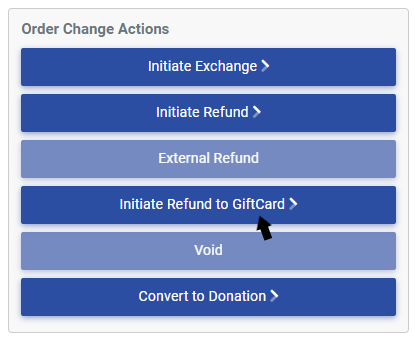
When you process a refund to a gift card, the value of the tickets from the event is fully refunded. The event reports will show that order has been refunded. However, the revenue isn't provided as a refund back to the customer's card. Instead, it's provided as a gift card...just like getting a plastic gift card in a store rather than a refund to the card.
All of the event revenue is then transferred to the gift card in the full balance from the original order. Gift Cards never expire and are essentially tracked as "unearned revenue" until they are redeemed.
You can see all gift cards and credits on the customer's profile, as shown below:

This shows gift cards and unapplied credits for that specific customer.
How gift cards work
If you have more questions on processing refunds, please view or video on Ticket Order Changes.
View our video tutorials
How gift certificates work
What happens to the remaining balance on a gift card?
Are we only charged for a purchased gift card once? What about when it's redeemed?
Does ThunderTix automatically create a gift card form for our website?
If we have an event that is $90 per person, can we create a $90 gift card?
How do I void a gift certificate?
How can I change the balance of a gift card?
