
Support Forum
How can I change the balance of a gift card? - Mon - Nov 8, 2021 - 12:44pm
The Gift Certificates page allows you to view all sold gift certificates and track their redemptions and remaining balance.
How do I reduce the remaining balance left on a gift card?
How do I reduce the remaining balance left on a gift card?
- Head to the Revenue Builders tab
- Click Gift Certificates
- Locate the gift certificate you wish to change from the orders list
- Click the balance under the Balance column
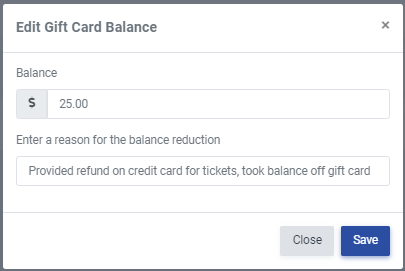
- Enter the correct remaining balance and a reason for the change, and click Save
How do I inactivate a gift card?
- Head to the Revenue Builders tab
- Click Gift Certificates
- Locate the gift certificate you wish to inactivate from the orders list
- Click 'Yes' under the Active column to change it to 'No'
How do I increase the balance on a gift card?
To increase the balance on the gift certificate, please follow the steps below:
- Head to Revenue Builders > Gift certificates
- Locate the 'Increase' column and click on the '+' icon.

- Enter in the amount you wish to increase your gift certificate by and click 'Create order and pay'.

- Process the order as normal.
IMPORTANT NOTE: Even though the balance will be added to the existing gift certificate, it will be a seperate order. These transactions will appear on the reconciliation report as an eGift Card balance increase.
View our video tutorials
How gift certificates work
What happens to the remaining balance on a gift card?
Are we only charged for a purchased gift card once? What about when it's redeemed?
Does ThunderTix automatically create a gift card form for our website?
If we have an event that is $90 per person, can we create a $90 gift card?
How do I void a gift certificate?
How can I refund a purchase as a credit or gift card?
