
Support Forum
Allow patrons to request a refund from their order confirmation email receipt. - Thu - Oct 14, 2021 - 11:17am
-
Patrons have the ability to request a refund from a link provided in their confirmation email. Only users logged into their ThunderTix portal, and with the necessary permissions, can process refunds on behalf of patrons.
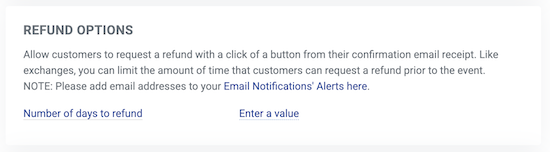
To allow patrons to request a refund, follow the steps below:- Head to CRM & Mass Mall > Customer Permissions
- Under REFUND OPTIONS, enter a value for the 'Number of days to refund'. The value entered in 'Number of days to refund' allows patrons to request a refund that many days prior to the event.
Refund Request Email Notifications
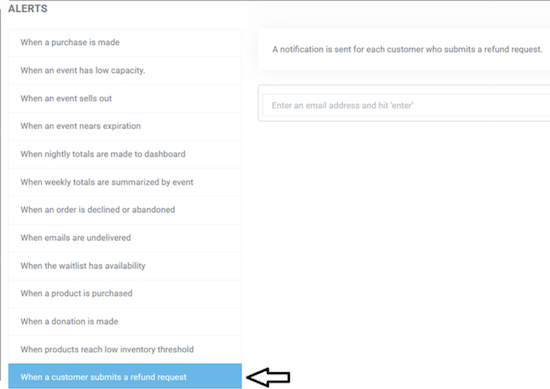
Next, you'll want to decide which members of your team receive an email alert when a customer requests a refund. - Head to Account Settings > Email Notifications
- In the Alerts section, click "when a customer submits a refund request"
- Enter the email address of the person who should receive this email and click enter to submit.
- Enter as many users as you'd like to be copied on this refund request notification

View our video tutorials
How do I delete an Order?
Why are orders missing from the Orders tab?
What happens to sales tax on an exchange?
How do I comp a ticket or comp an order (make a ticket complimentary)?
How can I waive fees for some orders?
How can we charge a small fee to our patrons for a ticket exchange?
Our show was canceled -- how do we process refunds?
