
Support Forum
How can I track sales done on the website vs. box office staff? - Fri - Nov 19, 2021 - 4:09pm
-
In ThunderTix, you can generate reports on orders made by customers from your website, by agents from your box office, or from Facebook sales.
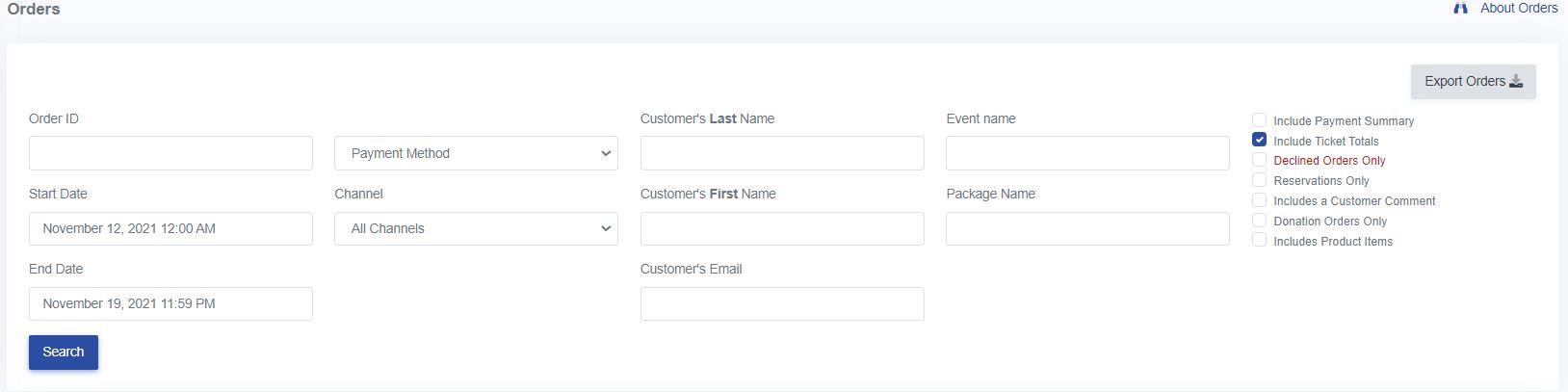
To filter orders by sale type:- Click Orders
- Under Channel, select the type -- All Channels, Website Sales, Facebook Sales, or Agent
- Specify a time period, if needed
- Click Search
When searching orders, you can include filters or totals by checking the options to the right of the filters. To include the number of tickets sold with the applied filters, select the checkbox for 'Include Ticket Totals'

View our video tutorials
How do I delete an Order?
Why are orders missing from the Orders tab?
What happens to sales tax on an exchange?
How do I comp a ticket or comp an order (make a ticket complimentary)?
How can I waive fees for some orders?
How can we charge a small fee to our patrons for a ticket exchange?
Our show was canceled -- how do we process refunds?
