
Support Forum
How to record a credit card payment taken outside ThunderTix - Fri - Oct 18, 2024 - 12:00pm
-
 Sometimes, you may sell tickets in ThunderTix but collect the customer’s payment somewhere else — for example, using a retail credit card terminal that is not connected to ThunderTix.If your organization uses a payment gateway other than Stripe or Square, ThunderTix cannot process that card payment directly through your account. However, you can still complete the ticket order in ThunderTix and record that the customer paid by credit card using an outside terminal.
Use the External Terminal payment option when:- The customer is paying by credit card.
- The card is being charged outside of ThunderTix.
- You want the order recorded in ThunderTix for ticketing, reporting, and reconciliation.
- You want the payment to appear as a credit card payment in your records.
Important: Choosing External Terminal does not charge the customer’s card in ThunderTix. You must process the payment separately using your own terminal before or while completing the order.How to record an External Terminal payment- Create the order in ThunderTix as usual.
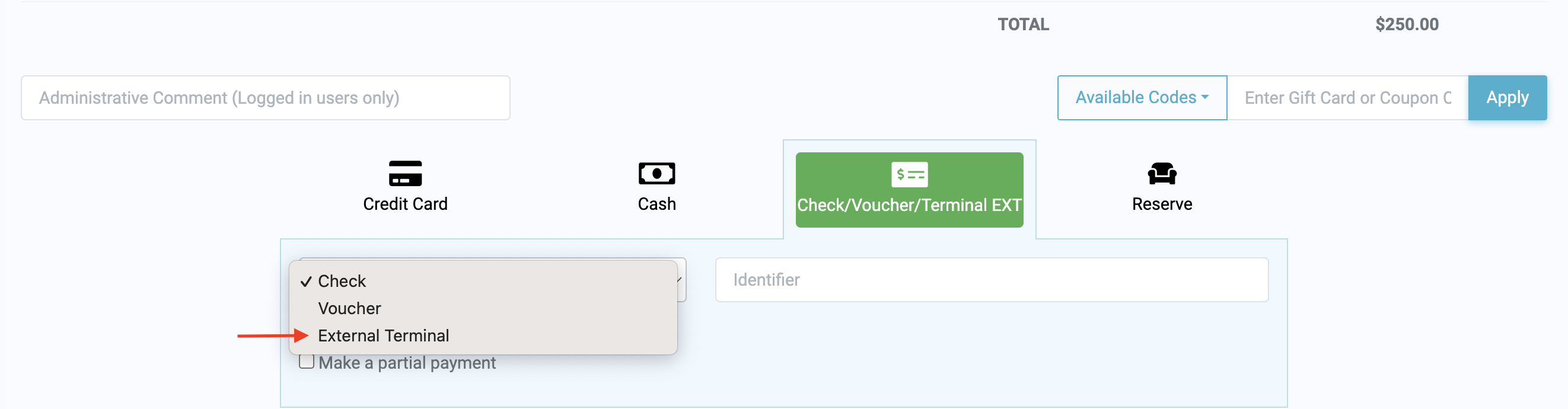
- When you reach the checkout page, select the Check / Voucher / External Terminal payment tab.
- From the payment type dropdown, choose External Terminal.
- Complete the order.
The order will be saved in ThunderTix, and the payment will be tracked as a credit card sale for reporting and reconciliation purposes.
When to use Check, Voucher, or External TerminalUse Check when the patron paid by check.Use Voucher when the order is being paid with a voucher or similar non-card payment method.Use External Terminal when the patron paid by credit card, but the card was charged outside of ThunderTix using a separate payment device or retail terminal.
View our video tutorials
How do I delete an Order?
Why are orders missing from the Orders tab?
What happens to sales tax on an exchange?
How do I comp a ticket or comp an order (make a ticket complimentary)?
How can I waive fees for some orders?
How can we charge a small fee to our patrons for a ticket exchange?
Our show was canceled -- how do we process refunds?
