
Support Forum
How can I update the customer on an order? - Thu - Jan 8, 2026 - 6:10pm
-
 To update the customer on an order please follow the steps below:
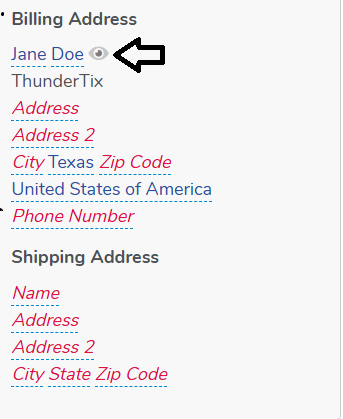
- Navigate to the billing address portion of the order.
- Click the Eye icon (pictured below)
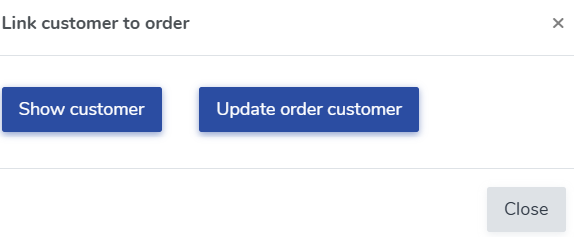
- Click 'Update order customer'
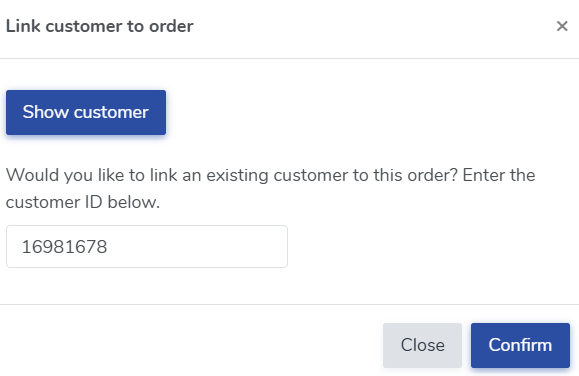
- Enter in the Customer ID for the customer you'd like to transfer the order to and click confirm.
- The order will now belong to the other customer.
This feature works great in situations where the customer purchases tickets for someone else or in the event the original customer is no longer able to attend and they want to tranfer their tickets to someone else.


View our video tutorials
Why can't all users see the patron database?
Is there a way to quickly recall a customer's info in case we need to call them?
Which customers get entered into the Customer Database?
How can I obtain customer data for those who have opted into our mailing list?
Is it possible to sort the guest list by the zip code from each order?
Customer Comments:
How do I disable the Auto-Fill feature on my account?
