
Support Forum
Can I See the Total Number of Tickets in My Email Confirmation? - Fri - Jan 16, 2026 - 11:56am
-
 We’re happy to share an update that makes email confirmations clearer and easier to read—especially for group and large ticket orders.What’s changed?Moving forward, email confirmations now include the total number of tickets purchased in the order.Instead of having to manually count each ticket line item, patrons (and admins reviewing confirmations) can quickly see the Ticket Count at a glance.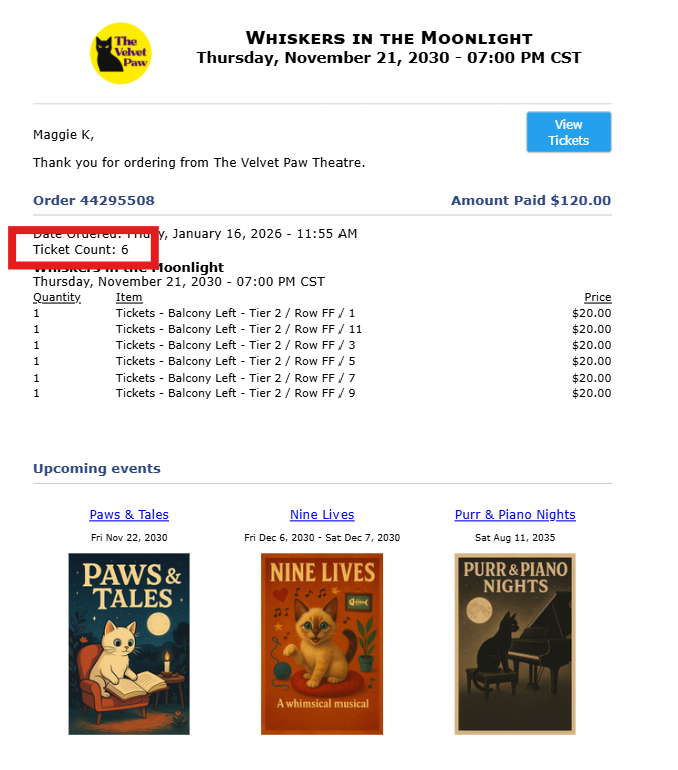
Why this mattersThis improvement is especially helpful for:- Group sales and bulk purchases
- Organizations managing large audience blocks
- Patrons who want quick confirmation of how many seats they’ve reserved
The goal is to reduce confusion and eliminate the need to manually tally tickets from the email.
Where you’ll see it
- The Ticket Count now appears directly within the email confirmation
- This applies to all ticket orders, regardless of size
- Group sales and bulk purchases

View our video tutorials
Why can't all users see the patron database?
Is there a way to quickly recall a customer's info in case we need to call them?
Which customers get entered into the Customer Database?
How can I obtain customer data for those who have opted into our mailing list?
Is it possible to sort the guest list by the zip code from each order?
Customer Comments:
How do I disable the Auto-Fill feature on my account?
