
Support Forum
How do I show “Doors Open” time if it’s different from show time? - Sat - Jan 31, 2026 - 11:35am
-
 ThunderTix doesn’t currently have a separate “Doors Open” field in event setup. Instead, the easiest way to communicate door time is to add a short custom message that prints on both the eTicket and the thermal ticket—so patrons see it right where they’re looking.Add “Doors Open” time to the ticket (eTicket + thermal)
- Go to Event Manager
- Click the name of your event
- Navigate to Ticket Delivery → eTicket Designer
- Scroll to “Add a short message to the eTicket and thermal ticket”
- Toggle YES for “Display an additional message on the ticket”
- Enter your message (shown below)
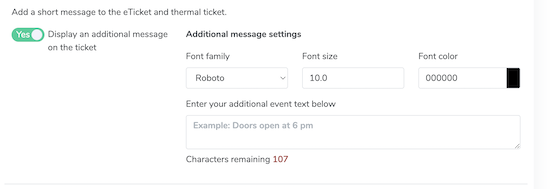
Example messages- Doors open at 6:00 PM • Show at 7:00 PM
- Lobby opens 60 minutes before showtime
- Doors: 6:30 PM | Performance: 7:30 PM
Once saved, customers will see this message on their ticket when it’s delivered and when it’s scanned at entry.
View our video tutorials
How do I create an option for postal mail rather than delivering tickets electronically?
How do I add sales tax on a ticket?
How can I add more ticket types to 1 single date of an ongoing event?
How do we limit the number of tickets that can be sold of a specific type?
What is the event Pre-sale and Post-sale Announcement?
What type of event fees would I add and where can I add them?
What kind of information should I enter at the bottom of the Email Confirmation?
