
Support Forum
How can I transfer an order to a group or organization? - Fri - Feb 20, 2026 - 3:38pm
-
 On the public purchase page, buyers can optionally enter a “Company” name at checkout. This field is useful for the buyer, but, it does not auto‑create or auto‑fill a Group/Organization (to protect private data and avoid accidental linking between unrelated buyers).
However, as a venue admin you can upgrade that company name into an official group and attach the order:- From the admin, open the order where the buyer entered a company name.
- Next to the company name, use the transfer icon (Font Awesome “arrow-right-from-arc” icon).
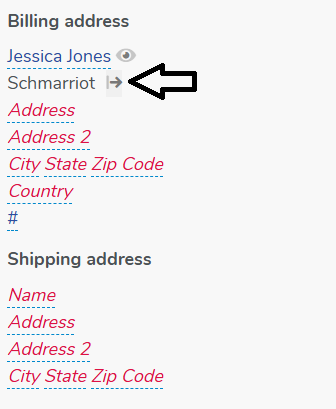
- Clicking this icon opens a Transfer modal, similar to the “eye” (view) modal.
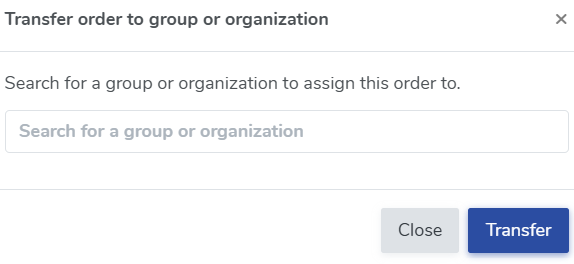
- In the modal, search for an existing Group/Organization by name (for example, “Thunder Data Systems”).
- If it exists, select it.
- If it does not exist you will need to create the Group/Organization by going to Patron Database > Groups and Organizations > +Create group/organization
- Confirm the transfer.
After the transfer:- The order is now officially linked to that Group/Organization (just as if you had chosen it during order creation).
- The company name is now part of your Groups & Organizations data, not just a free‑text field.
- Future orders can reuse that group record.
Suggested uses for this tool:- When a customer typed a company/school name during online purchase, and you want to fold that into your official G/O structure.
- When you recognize repeat company names and want accurate reporting and group history.
View our video tutorials
How do I delete an Order?
Why are orders missing from the Orders tab?
What happens to sales tax on an exchange?
How do I comp a ticket or comp an order (make a ticket complimentary)?
How can I waive fees for some orders?
How can we charge a small fee to our patrons for a ticket exchange?
Our show was canceled -- how do we process refunds?
