Sat - Mar 14, 2026 - 9:26am
⚬
0 Comments
Customers
If you need to investigate a suspicious order, you can open the related payment directly from ThunderTix in Stripe. From there, Stripe also gives you the option to block the customer from making future payments through Stripe.
Open the payment in Stripe from ThunderTix
Find and open the order in ThunderTix.
In the order details, locate the Stripe transaction or purchase link.
Click the link to open that payment in your Stripe dashboard.Find the link to go directly to the purchase in Stripe
This takes you straight to the matching transaction so you can review the payment details in Stripe.
Review the payment in Stripe
Once the transaction opens in Stripe, review the available details, such as:
the payment status
the card and billing details
the customer email address
any fraud insights Stripe provides
This can help you confirm whether the payment looks legitimate before taking further action.
Add the customer to Stripe’s block list
If the payment appears fraudulent or you want to prevent future payments from that customer, use Stripe’s blocking controls on the payment record.
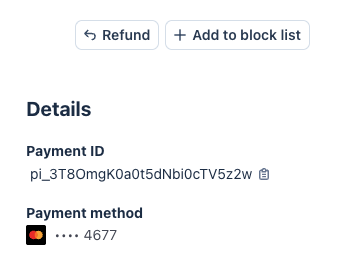
In Stripe, look for the option to block future payments associated with that customer or payment method. Depending on the Stripe screen and your account settings, this may appear as an option to block the card, customer, or related payment source.
Add to block list in Stripe
After the block is applied in Stripe, future attempts using that same payment source may be declined by Stripe.
When this is helpful
You may want to do this when:
a customer files a chargeback
the order appears suspicious
Stripe flags the payment as high risk
you see repeated fraudulent purchase attempts
Important note
Stripe’s fraud tools look beyond the customer name and email address. When Stripe identifies and blocks suspicious activity, it can use a broader set of signals—such as payment method information, IP and device-related indicators, and behavioral patterns—to recognize repeat attempts. That means a fraudster may still be flagged and blocked even if they try again with a different customer name or email address.
Blocking a patron in ThunderTix and blocking a payment source in Stripe are separate actions.
ThunderTix block list prevents future orders in ThunderTix for that venue.
Stripe blocking tools help prevent future payments from being processed through Stripe.
For the strongest protection, you may want to block the patron in both places.

 If you need to investigate a suspicious order, you can open the related payment directly from ThunderTix in Stripe. From there, Stripe also gives you the option to block the customer from making future payments through Stripe.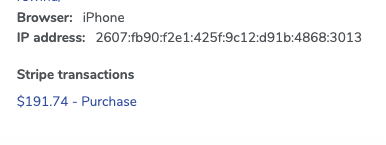
 After the block is applied in Stripe, future attempts using that same payment source may be declined by Stripe.