
Support Forum
ThunderTix Now Displays Total Ticket Pricing and Fees on Seating Charts - Tue - Apr 21, 2026 - 2:37pm
-
 ThunderTix now displays total ticket pricing directly on the seating map when patrons hover over seats. This update improves pricing transparency and helps ensure compliance with pricing regulations.Total price shown on hoverWhen a seat has only one available price, the full ticket cost is now displayed when a patron hovers over that seat.This total includes:
- Base ticket price
- Service fees
- Credit card processing fees
Patrons can now see the final cost before selecting a seat, rather than waiting until checkout.
Messaging for multiple price optionsIf a seat has multiple pricing options (such as Adult, Senior, Child, or Military), the hover display will now show a message instead of a single price:Total price varies by ticket typeThis lets patrons know that pricing depends on the ticket type they choose and prevents confusion when multiple rates are available.
How it works- Hover over a seat on the seating map
- If there is only one price available, the total cost (including all fees) will be displayed
- If multiple price types are available, a message will indicate that total pricing varies
For reserved seating: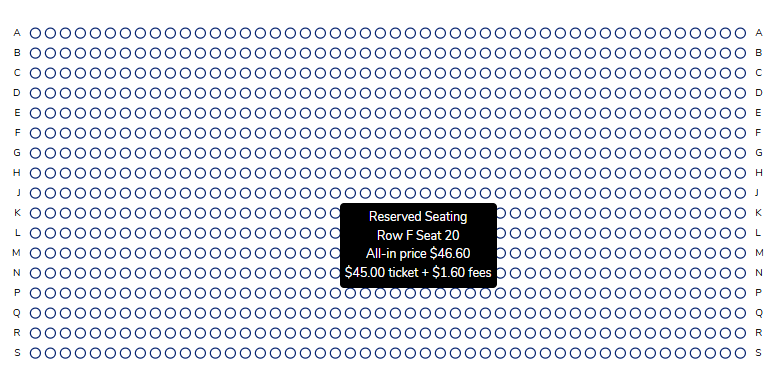 This update helps:
- Provide full pricing transparency earlier in the buying process
- Improve the patron experience by reducing surprises at checkout
- Ensure compliance with laws requiring all-in pricing, including New York State regulations
Things to keep in mind- The all-in total price is only shown when a seat has a single pricing option
- Seats with multiple ticket types will not display a single total price
- Fees are still itemized during checkout for clarity

View our video tutorials
How do I delete an Order?
Why are orders missing from the Orders tab?
What happens to sales tax on an exchange?
How do I comp a ticket or comp an order (make a ticket complimentary)?
How can I waive fees for some orders?
How can we charge a small fee to our patrons for a ticket exchange?
Our show was canceled -- how do we process refunds?
