
Support Forum
How can I see which customers unsubscribed from my mass emails? - Tue - Apr 28, 2026 - 4:00pm
-
 When you send a mass email, customers can click the Unsubscribe link at the bottom of the email to opt out of future messages.
You can now view exactly which customers unsubscribed from a campaign.
To see unsubscribed customers:- Go to Mass Email
- Open the campaign you want to review
- In the campaign results, you’ll see:
- The total number of unsubscribes
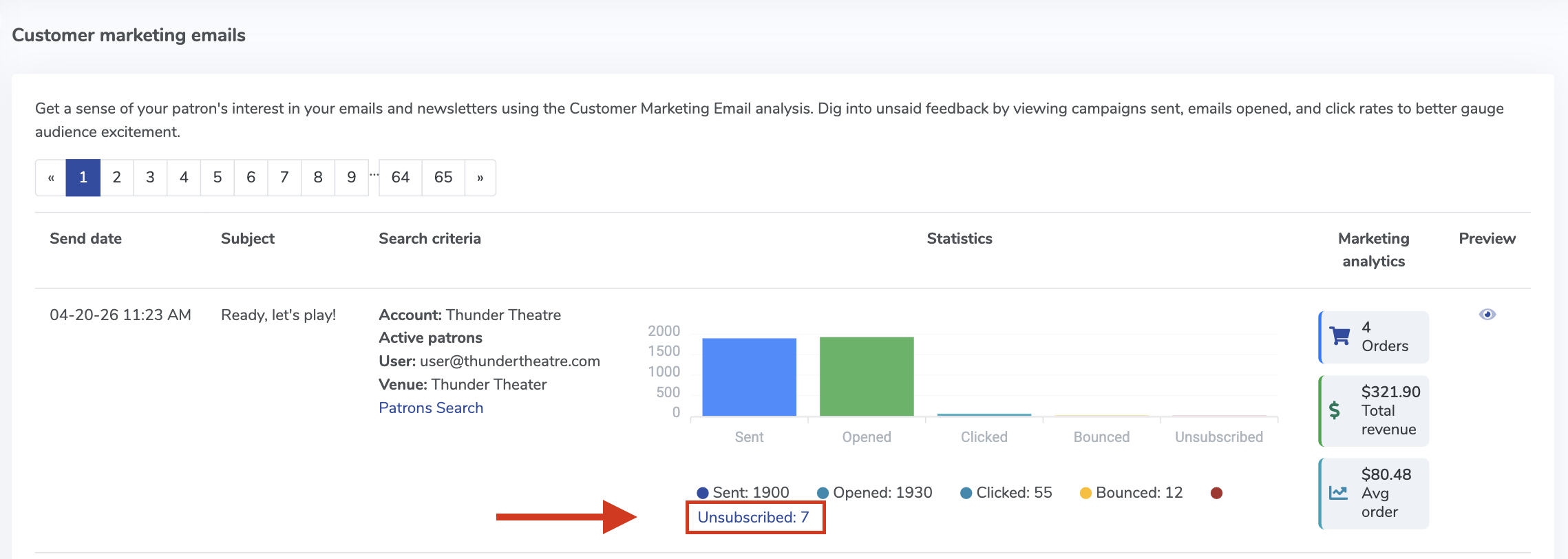
total number of unsubscribes - The list of customers who unsubscribed
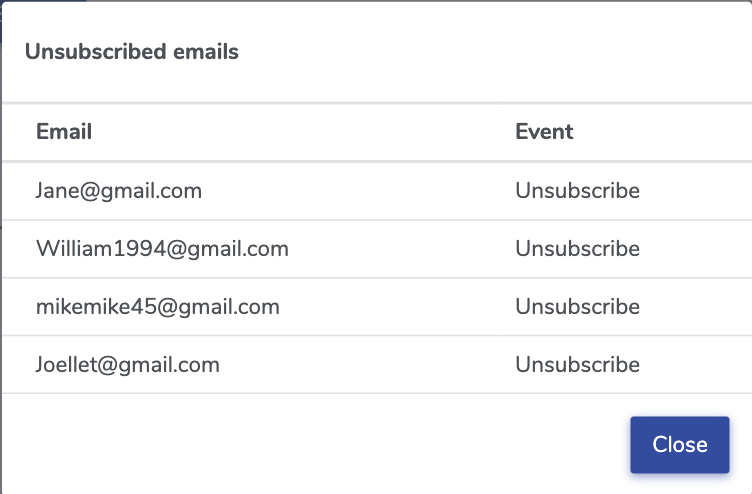
list of customers who unsubscribed
If a customer subscribes again later, they’ll automatically be removed from the unsubscribed list.
For more details on creating and managing campaigns, check out our Guide to Creating Mass Mail Templates


View our video tutorials
How to customize the eTicket sent as a PDF ticket with each email
How can I change the venue name shown on the email confirmation sent to my buyers?
How can I copy order confirmation emails to two different email addresses?
Will my customer receive a confirmation email after a refund is processed?
The customer did not receive the eTicket as a PDF
How can I receive an email notification whenever a purchase is made?
How do I change the sender address on the email confirmation receipt?
