
Support Forum
New CRM Feature: Automated Patron Targeting Starts TODAY! - Fri - Jun 19, 2026 - 10:23am

I recently hosted a live demo of one of the most powerful audience intelligence features we've added to ThunderTix CRM, and I'm excited to share it with you. The new Patron Lifecycle and RFM Segmentation tools help you better understand who your patrons are, where they are in their journey, and how to engage them more effectively.
Patron Lifecycle:
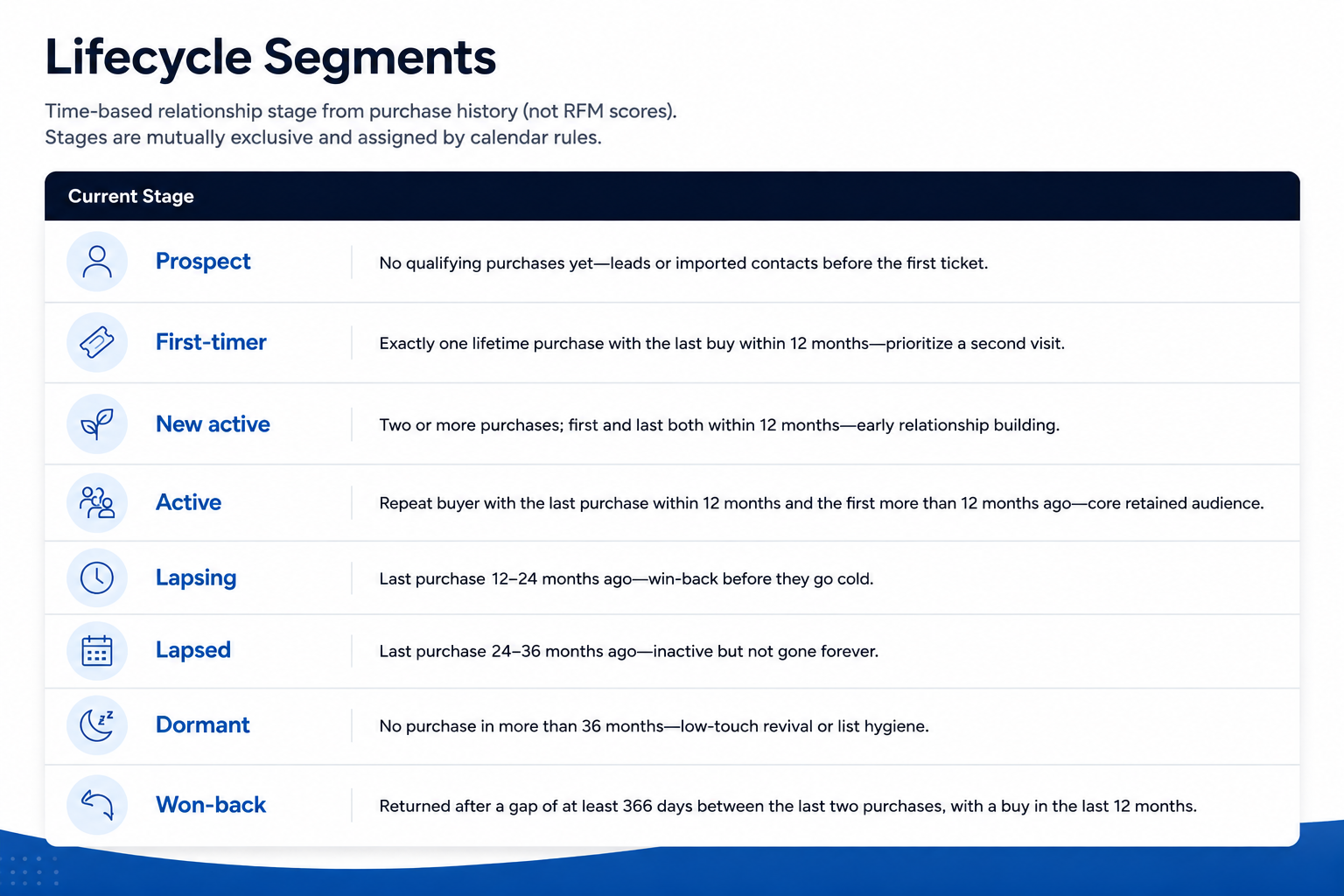
Patron Lifecycle answers the question: What type of customer is this?
You can see each lifecycle stage and the criteria that qualifies a patron for each stage below:
You can see each lifecycle stage and the criteria that qualifies a patron for each stage below:
RFM Segmentation:
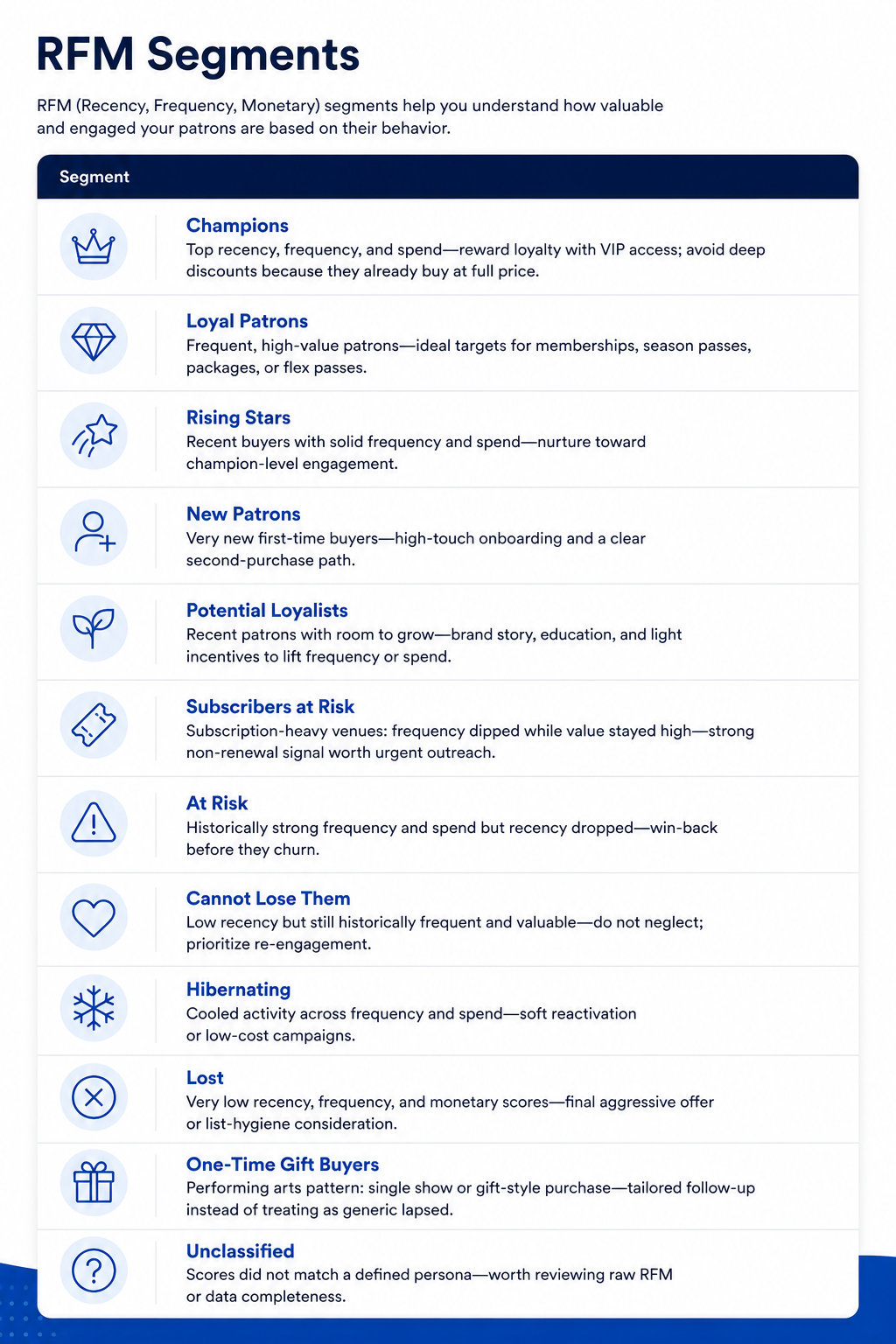
RFM Segmentation answers the question: How valuable and engaged is this customer?
Using Recency, Frequency, and Monetary data, ThunderTix automatically groups patrons into meaningful audience segments. RFM scores are based on your venue's patron data, not fixed industry benchmarks.
Each patron receives a score from 1–5 in three categories:
• Recency (R): How recently they made a purchase
• Frequency (F): How often they purchase (within the last 24 months)
• Monetary (M): How much they spend
• Frequency (F): How often they purchase (within the last 24 months)
• Monetary (M): How much they spend
A score of 5 means the patron is in the top 20% of your audience for that category, while a score of 1 means they are in the bottom 20%.
For example, a patron with an RFM score of 545 is:
• Very recent purchaser (5)
• Above-average purchaser frequency (4)
• Top-tier spender (5)
• Very recent purchaser (5)
• Above-average purchaser frequency (4)
• Top-tier spender (5)
Because scores are based on quintiles (20% groups), the actual dollar amounts, purchase counts, and recency ranges vary from venue to venue. A "5" in Monetary might mean spending over $300 at one venue and over $1,000 at another.
This approach ensures your segments are tailored to your audience rather than relying on one-size-fits-all thresholds.
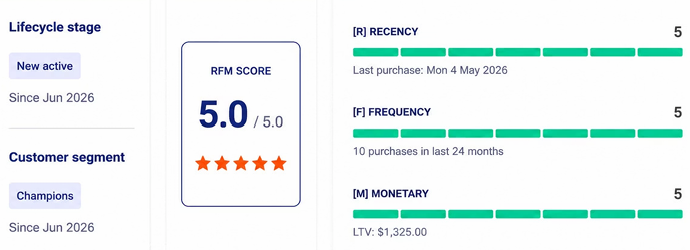
You will be able to see each patron's RFM score and Lifecycle stage on their patron profile:

The real power comes from combining Lifecycle and RFM data to create highly targeted audiences for marketing, fundraising, membership campaigns, and patron retention.
Here are a few examples:
Audience Recipe #1: Your Highest Revenue Patrons
Lifecycle: Active or Won-Back
RFM: Champions
RFM: Champions
Who They Are:
• Attend frequently
• Spend the most
• Recently engaged
• Attend frequently
• Spend the most
• Recently engaged
Marketing Ideas:
• VIP experiences and exclusive events
• Early access sales and membership upgrades
• Donor cultivation campaigns
• VIP experiences and exclusive events
• Early access sales and membership upgrades
• Donor cultivation campaigns
Audience Recipe #2: Save Your Most Valuable Customers
Lifecycle: Lapsing
RFM: Cannot Lose Them
RFM: Cannot Lose Them
Who They Are:
• Historically high spenders
• Previously loyal attendees
• Showing signs of disengagement
• Historically high spenders
• Previously loyal attendees
• Showing signs of disengagement
Marketing Ideas:
• Personal outreach and Executive Director calls
• Special invitations and renewal campaigns
• Re-engagement offers
• Personal outreach and Executive Director calls
• Special invitations and renewal campaigns
• Re-engagement offers
Audience Recipe #3: New Patrons Worth Investing In
Lifecycle: First-Timer
RFM: Potential Loyalists
RFM: Potential Loyalists
Who They Are:
• Recently discovered your venue
• Showing strong early engagement signals
• Most likely to become repeat buyers
• Recently discovered your venue
• Showing strong early engagement signals
• Most likely to become repeat buyers
Marketing Ideas:
• Welcome campaigns
• Second-show discounts
• Personalized recommendations
• Upcoming event announcements
• Welcome campaigns
• Second-show discounts
• Personalized recommendations
• Upcoming event announcements
Want more audience segmentation ideas?
We've put together a collection of our most effective audience segmentation recipes to help you drive attendance, increase revenue, and strengthen patron relationships.
Download the Audience Segmentation Recipe Guide:
Understanding-Patron-Lifecycle-and-RFM-Segmentation.pdf 5.32 MB
Understanding-Patron-Lifecycle-and-RFM-Segmentation.pdf 5.32 MB
Watch the demo, explore the new feature, and start building smarter audiences today.
View our video tutorials
Why can't all users see the patron database?
Is there a way to quickly recall a customer's info in case we need to call them?
Which customers get entered into the Customer Database?
How can I obtain customer data for those who have opted into our mailing list?
Is it possible to sort the guest list by the zip code from each order?
Customer Comments:
How do I disable the Auto-Fill feature on my account?