
Support Forum
Group Holds - Mon - Sep 14, 2026 - 11:42am

Group holds
A group hold reserves tickets for one group on one upcoming performance so those seats are not sold to the public. The group can buy from the reserved inventory with a purchase link, or staff can sell against the hold at the box office, until the hold expires or the tickets are gone.
Holds live on the group record (CRM → Groups & Organizations & Households). There is also a venue-wide Group holds list (still marked BETA) for scanning every active or inactive hold.
What a hold does
- General admission: you reserve a quantity. Those tickets come out of public availability.
- Reserved seating: you pick the seats. Those seats are blocked for the group (shown as a group hold on the chart).
-Purchasing link email: the email liaisons receive starts with default text, which you can edit for each hold. Use tokens to fill in details automatically: first name, last name, title, venue, date, event, performance, hold expiry date and link.
- Orders placed from the hold link, or via Process order, attach to the group automatically.
- Optional group discount coupon applies to ticket orders through that hold’s purchase link. Package-only group discounts are not available.
- A coupon’s ticket minimum does not apply to hold-link orders.
A hold is not the same as assigning an existing order to a group. Assignment is “this order belongs to this group.” A hold is “this inventory is reserved until they buy.”
Before you create a hold
1. Create the group or organization (CRM → Groups & Organizations).
2. Add members on the Members tab.
3. Mark at least one person as Liaison. ThunderTix will not let you create a hold without a liaison — you are sent back to Members with: Assign a group liaison on the Members tab before creating holds.
Liaisons are the people who automatically receive the purchasing link when the hold is created.
How to add a group hold
1. Open the group.
2. Go to the Holds tab.
3. Click Create hold.
You can also start from the group’s Create hold action when holds are enabled for the account.
Fill in the form
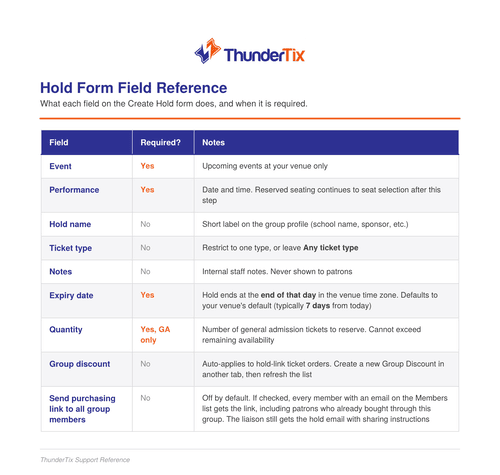

General admission
After you choose a GA performance, enter Quantity and click Create hold.
Reserved seating
After you choose an RS performance, click Select seats, pick the seats on the chart, then click Create hold. Quantity is the number of seats you selected.
If seats become unavailable between picking and saving, you get One or more seats are unavailable.
What happens when the hold is created
- Inventory is locked (GA quantity, or the selected RS seats).
- The hold appears on the group’s Holds tab as Active.
- Liaisons get an email: Your group purchasing link is ready, with event, performance, seats reserved, expiry, and the link.
- Members get an invite email only if you checked Send purchasing link to all group members.
Anyone with the link can buy from the reserved inventory until the hold expires or the remaining tickets are gone.
After the hold exists
On the Holds tab, Select on a row:
-Edit details — name, notes, ticket type, coupon, and the hold's email text.
- General admission: raise or lower the quantity. It can’t go below seats already purchased or in an unpaid checkout, or above the seats still available.
- Reserved seating: reopen the seat picker to add or remove seats. Purchased seats and seats in an unpaid checkout can’t be removed, and removed seats go back on sale.
- Extend expiry — move the end date out.
- Process order — box office sale against the hold.
- Send to liaison(s) / Send to members — email the current purchase link.
- Copy link — generate if needed, then copy.
- Regenerate — new link; the old one stops working immediately.
- Invalidate — link stops working immediately.
- Delete hold — cancels the hold and releases unused inventory.
The table shows performance, name, discount, qty, purchased, remaining, hold status, and link status.
Remaining is quantity minus paid tickets minus tickets sitting in unfinished checkouts (pending, declined, balance due, reserved).
- Process order — box office sale against the hold.
- Send to liaison(s) / Send to members — email the current purchase link.
- Copy link — generate if needed, then copy.
- Regenerate — new link; the old one stops working immediately.
- Invalidate — link stops working immediately.
- Delete hold — cancels the hold and releases unused inventory.
The table shows performance, name, discount, qty, purchased, remaining, hold status, and link status.
Remaining is quantity minus paid tickets minus tickets sitting in unfinished checkouts (pending, declined, balance due, reserved).
Hold and link status
Hold
- Active — reserved and still purchasable
- Fully purchased — all reserved tickets sold
- Expired — past the expiry date (unused inventory is released)
- Cancelled — deleted, or cancelled because the performance was removed
Purchase link
- Active / Not generated / Invalidated / Link expired
A link is not available if there is no liaison, the hold is expired, or nothing remains to sell.
Other places staff see holds
- Group holds (BETA) — venue-wide Active / Inactive list. Create a group from here; create the hold on the group’s Holds tab. Use Manage or Process order.
- Active group holds on a performance — which groups are sitting on that show.
Liaisons get a reminder about 3 days before expiry. If a performance is rescheduled, an active hold’s expiry can be pulled in to 24 hours before the new show time (or the hold expires if that window is already past).
Short flow: create the group → mark liaisons → Holds → Create hold → share the link or process at the box office → watch remaining, then extend, regenerate, or delete as needed.
View our video tutorials
Why can't all users see the patron database?
Is there a way to quickly recall a customer's info in case we need to call them?
Which customers get entered into the Customer Database?
How can I obtain customer data for those who have opted into our mailing list?
Is it possible to sort the guest list by the zip code from each order?
Customer Comments:
How do I disable the Auto-Fill feature on my account?