
Support Forum
How to view donations from past donors - Mon - Nov 15, 2021 - 9:18am

How to view donations from past donors
The Patron Database has several searches for retrieving donor histories, and each one can be exported with donation totals.
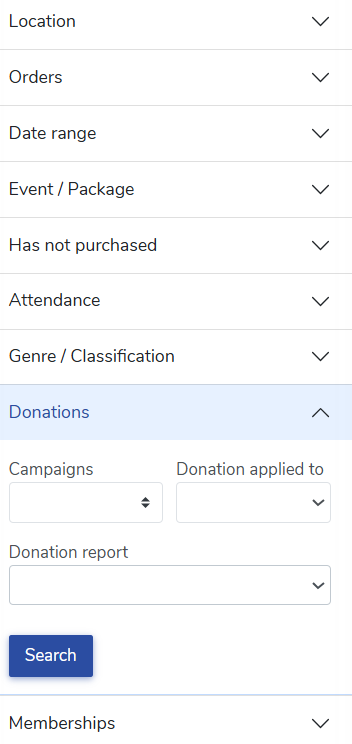
- Go to Patron Database > CRM & Mass Mail
- Click the Donations tab.
- Choose one of the search options explained below.
Has made at least
Find donors who met a giving threshold. Enter a dollar amount in “Min. donation value” to find everyone who gave, say, $100 or more. Use the “Donations” field to require a minimum number of gifts. Leave it blank to include all donors who meet the threshold.
Find donors who met a giving threshold. Enter a dollar amount in “Min. donation value” to find everyone who gave, say, $100 or more. Use the “Donations” field to require a minimum number of gifts. Leave it blank to include all donors who meet the threshold.
Donor classification
Limit results to donors in one of your donor levels, or leave it on “All donor levels”.
Limit results to donors in one of your donor levels, or leave it on “All donor levels”.
Campaigns
Find donors who gave to any, or all, of the fundraising campaigns you select. When you select a single campaign, you can also narrow results to one campaign level.
Find donors who gave to any, or all, of the fundraising campaigns you select. When you select a single campaign, you can also narrow results to one campaign level.
Donation applied to
Choose “Purchase process” to find donations made during a ticket purchase, including round-up donations. Choose “Campaign” to find gifts made directly to your fundraising campaigns.
Choose “Purchase process” to find donations made during a ticket purchase, including round-up donations. Choose “Campaign” to find gifts made directly to your fundraising campaigns.
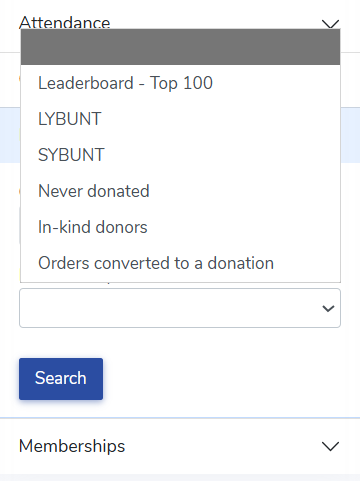
Donation report
These ready-made reports answer the most common donor questions:
These ready-made reports answer the most common donor questions:
- Leaderboard - Top 100: Your top donors, either all-time or over the past 12 months.
- LYBUNT: “Last year but unfortunately not this year”. Donors who gave last year and have not yet given this year.
- SYBUNT: “Some year but unfortunately not this year”. Donors who gave in any past year and have not yet given this year.
- Never donated: Patrons who have never given and may be ready for a first gift.
- In-kind donors: Patrons who have given goods or services.
- Orders converted to a donation: Patrons who turned a ticket order into a donation.
Narrow by date
Click the Date range tab and enter dates under “Purchased / donated between” to limit results to a time period, such as your fiscal year. Turn on “Retrieve new customers only” to see only first-time customers and donors.
Click the Date range tab and enter dates under “Purchased / donated between” to limit results to a time period, such as your fiscal year. Turn on “Retrieve new customers only” to see only first-time customers and donors.
Click Search to see the results on screen.
Export the results
For larger lists, click Export results and choose one of three CSV options:
For larger lists, click Export results and choose one of three CSV options:
- Patrons: One line per patron with their contact details.
- Individual donations: One line per donation. Three gifts totaling $110 appear as three lines, each with its own amount, campaign, and order date.
- Aggregated donations: One line per patron with their donations in your search totaled in the “Aggregate amount” column. Three gifts totaling $110 appear as one line. This is the best choice for year-end giving lists and donor recognition.

Survey answers in your donation exports
If you add a survey question to a fundraising campaign, such as “How would you like the donation to be acknowledged?”, the donor’s answers are included in both donation exports. Each survey question gets its own column at the end of the file.
If you add a survey question to a fundraising campaign, such as “How would you like the donation to be acknowledged?”, the donor’s answers are included in both donation exports. Each survey question gets its own column at the end of the file.
- In Individual donations, the answer appears on the line for that donation.
- In Aggregated donations, all of the patron’s answers appear together, each with the date of the donation. For example: 2/15: The Smith Family | 6/10: Anonymous
A blank means the donor did not answer the question on that gift.
View our video tutorials
Where can I see the total collected donations?
How do I make a donation request? Can I customize the donation wording?
Can my customers make a donation without buying a ticket?
How can I customize the email sent to customers who make a donation through an event?
Fundraising Campaigns and Donations now available on events
Targeted Donation Messaging and Recurring Donations
How do the round-up donations work?
