
Category: Donations

Customers can make donations without buying a ticket if you create a Campaign from the Fundraising tab on your left-hand menu (Giving >> Fundraising Campaigns). You can customize your campaign with a description, image, and a financial goal you would like to reach in donations. You ca
... (continued)
How to view donations from past donors
The Patron Database has several searches for retrieving donor histories, and each one can be exported with donation totals.
- Go to Patron Database > CRM & Mass Mail
- Click the Donations tab.
- Choose one of the search options explained below.
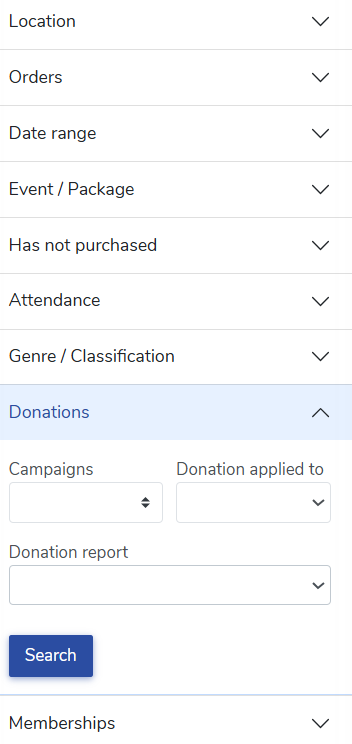
Has made at
... (continued)
Round-up donations invite your patrons to add a small gift at checkout. When a patron reaches the checkout page, we ask if they’d like to round up their order total as a donation to your organization. Your box office staff see the same ask when they process an order.
Turn it on
Round-up
... (continued)

You can customize the wording patrons see when they’re invited to round up their purchase at checkout. You can also choose the round-up increment, add preset donation amounts, and pick which campaign receives the gifts.
This discussion is specific to round-up donations at checkout. To
... (continued)
From the Patrons page, you can export a spreadsheet of donors and their donation totals within a specified date range. To get a list of donors and their donation totals, navigate to the following:
- Head to your Patron Database >> CRM & Mass Mail.
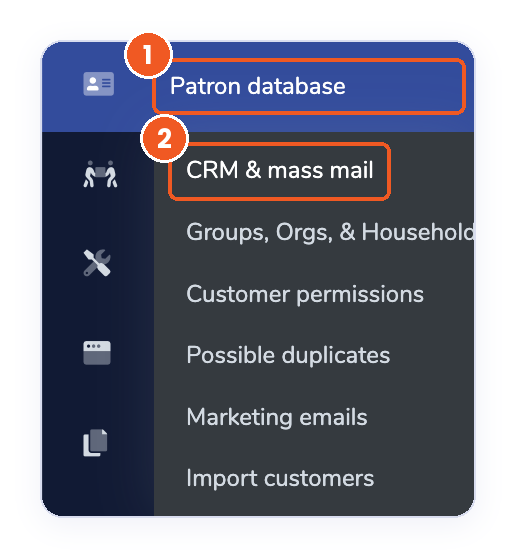
- Open the Donations section.
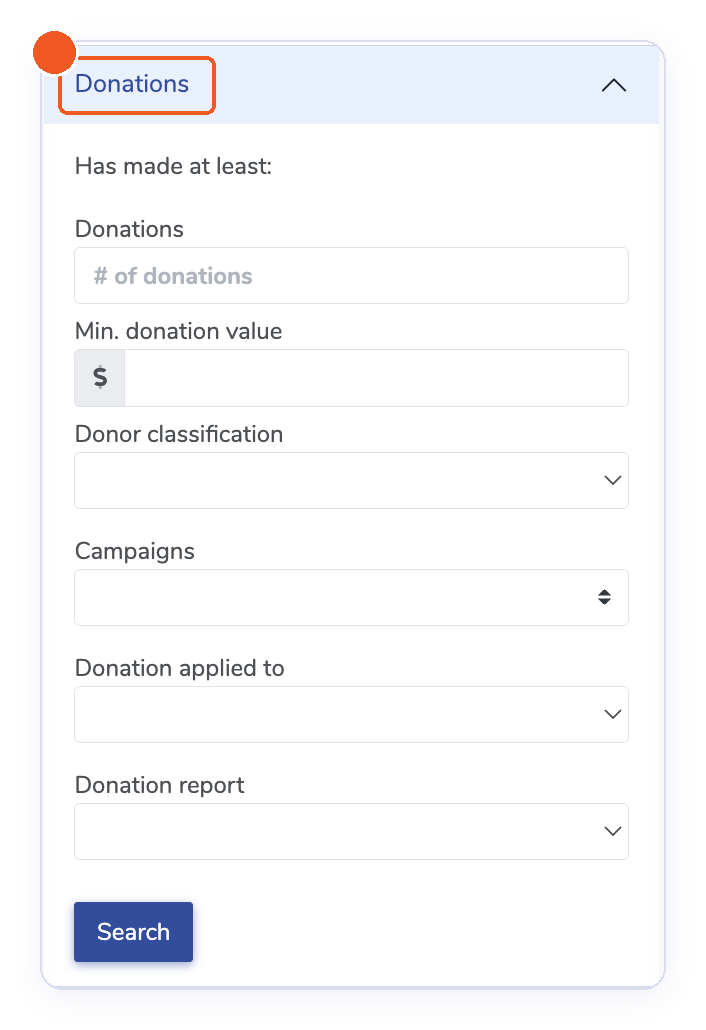
- Enter the m

When you create an online fundraising campaign, you can attach a "survey". Include any number of custom questions for donors to see when they make a donation through an online fundraising campaign.
Here are a few questions you might ask:
Here are a few questions you might ask:
- Is this donation in honor of anyone? If so, pleas

We are excited to share a small but impactful update to your Campaigns management page!
To help you better track your fundraising efforts at a glance, we have added a new sorting arrow to the "Progress" column.
What’s New:
-
Sort by Progress: You can now click the arrow in the Progress col
With fundraising campaign donations, you can now request your patrons to cover the credit card processing fees to earn more support from their donation!
To enable the request from your patrons to cover credit card processing fees with a new fundraising campaign, please follow the step
... (continued)
To enable the request from your patrons to cover credit card processing fees with a new fundraising campaign, please follow the step
Donation Thank You Letterhead & Email Notifications
ThunderTix gives you a way to create a personalized Donor Thank You Letterhead and automatically generate it when a donation falls within a specific dollar range.
This can help your team recognize meaningful gifts, streamline donor fol
... (continued)
Add an Authorized Signature Image to Your Donation Receipts (Canada Only)
We’ve added a new enhancement to donation receipts for our Canadian organizations.
You can now:
- Upload an image of an authorized signature (for example, your Executive Director’s signature) to your donation templat
To see reports for your General Donations and Orders converted to a donation follow the steps below:
- Head to Giving > Fundraising Campaigns
- Scroll down to General Donations or Conversion depending on what information you want to see
- Under Reports you should see the following options- Exp
You can update a reccuring donation in Stripe without cancelling the current recurring donation.
1. Log into your Stripe account
2. Go to the Customers tab
3. At the top of the Customers tab, click the "Repeat Customers" button
4. Find the customer in question on the short page of returne
... (continued)
1. Log into your Stripe account
2. Go to the Customers tab
3. At the top of the Customers tab, click the "Repeat Customers" button
4. Find the customer in question on the short page of returne
Absolutely! With AI Assistance, we can help you write your campaign description. This works for existing campaigns and new campaigns.
To use AI assistance on an existing campaign head to Giving > Fundraising Campaign > Edit. Click on the 'AI Assistance- We can write it for you!' butto
... (continued)
To use AI assistance on an existing campaign head to Giving > Fundraising Campaign > Edit. Click on the 'AI Assistance- We can write it for you!' butto
First, you should know that ThunderTix allows you to customize your Donation "thank you" email. Any time a patron gives a donation -- either on an order or through a Campaign -- we automatically send them a "thank you" letterhead to patrons who make a donation equal to or grater than
... (continued)
When setting up a fundraising campaign in ThunderTix, you’ll come across two helpful tools: Donor Classifications and Donation Levels. While both are used to organize and encourage giving, they serve slightly different purposes. Here’s a breakdown to help you use both effectively:
Dona
Donations may be made as a one time donation or the option to make them recurring.
Monthly Recurring Donations
We know many of you use third party donations platforms to collect monthly recurring donations from your donors. Now, with ThunderTix, you can have your general donations, cam
... (continued)
Campaigns can now be specified on events
When customers make a donation with an event, the donation can now be specified to a specific fundraising campaign. To take advantage of this new option, edit an existing event where donations are allowed. Select from a list of your existing Fu
To add suggested donation amounts to your event follow the steps below.
Please note that you must have donations enabled for your event for this feature to work.
Please note that you must have donations enabled for your event for this feature to work.
- Head to Event Manager > Donations > Click the gear cog icon next to Donations.
- When prompted click the 'Add Default Donatio
When a patron cannot make it to attend a show, the patron has the option to give the tickets back to the venue as a donation rather than requesting a refund back to their credit card.
- Click on the desired Order ID.
- Under Order Change Actions, click Convert to Donation. (see 1st screen
From the Giving tab, you may set Donor Classifications which provide a way for you to categorize donors by their cumulative donations in either a rolling 12-month period or a custom time frame based on your seasonal calendar. Donor classifications are quite similar to fundraising camp
... (continued)
For any event, you have the ability to enable optional donations.
When you create the event, under the Event Listing tab, after filling out your Event Basics (such as your event's Name, Ticket Types, Date & Time, etc.) scroll to the bottom and click on the menu bar titled Other Option
... (continued)
When you create the event, under the Event Listing tab, after filling out your Event Basics (such as your event's Name, Ticket Types, Date & Time, etc.) scroll to the bottom and click on the menu bar titled Other Option
Many organizations have a donation range that qualify for various membership levels. For example, one donation range might be $250-$499. We now offer a way to create a suggested default donation amount for specific donor levels.
To take advantage of this feature head to Giving > Fundra
... (continued)
To take advantage of this feature head to Giving > Fundra
You now have the ability to customize your date range to view Donor Classifications! Previously, the donors were listed based on the last 12 months, but now you can enter and save your preferred calendar dates in Donor Classifications.
To take advantage of this new feature head to Giv
... (continued)
To take advantage of this new feature head to Giv
You can add to a specific event to a campaign when a customer gets to the checkout page and accept donations on tickets by including one or more campaign options.
Follow these steps to add a campaign (or two!) to your event:
1. Head to Event Manager > Donations > then click the gear i
... (continued)
Follow these steps to add a campaign (or two!) to your event:
1. Head to Event Manager > Donations > then click the gear i
Donations given by patrons can be recorded on a patron record after the donation has been given.
To backdate donations given by a customer, do the following:
- On the left-hand Menu, head to Patron Database > Search and Mass Mail.
- Enter the patron's last name and click Search Customers.
- S
To reallocate a donation to a different fundraising campaign, you will first need to go into the donation order.
From there, you will click "(Click to change allocation)".

After you click that, a drop-down menu will pop up and you will select what campaign you would like to move the do
... (continued)
From there, you will click "(Click to change allocation)".
After you click that, a drop-down menu will pop up and you will select what campaign you would like to move the do
This feature is available for Stripe and Square Gateway users only.
We chose Stripe for several reasons:
We chose Stripe for several reasons:
- They offer fantastic rates with no monthly fees.
- Stripe has even lower fees for non-profits.
- Their gateway connection allows us to see errors to help you troubleshoot any refund c
In-Kind or non-cash donations can be added and tracked from a patron record.
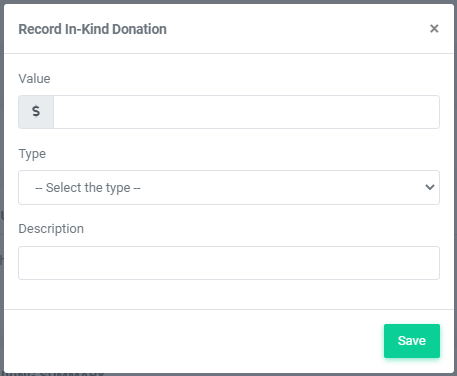
To track an In-Kind donation given by a customer, do the following:
- Head to your Patron Database > Search and Mass Mail
- Search for the patron from the Customer Data tab and click Search Customers.
- Click on the
If you have not yet provided an Order History import to our customer support team, please do so using the Order History Template found in your Patron Database >> Import Customers. This will allow you to import order history for multiple patrons. This donation history would appear on t
... (continued)
Absolutely! All donations given should be recorded for accurate data on revenue earned each year and per patron.
To process a donation given by check, please do the following:
To process a donation given by check, please do the following:
- Head to Giving > Fundraising Campaigns
- Select Donate on the fundraising campaign where you want the donation a
