
Support Forum
How can I view Donor Classifications for last season? - Wed - Apr 10, 2024 - 10:20am

You now have the ability to customize your date range to view Donor Classifications! Previously, the donors were listed based on the last 12 months, but now you can enter and save your preferred calendar dates in Donor Classifications.
To take advantage of this new feature head to Giving > Donor Classifications. There will be a new option for you to select your customized date range rather than the past 12 months.
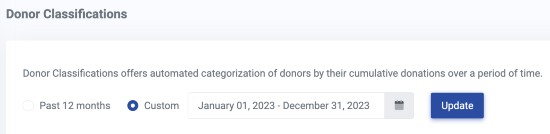
Click 'Update' to save your selected date range. Moving forward, you will be able to view Donor Classifications on this customized timeline.
To take advantage of this new feature head to Giving > Donor Classifications. There will be a new option for you to select your customized date range rather than the past 12 months.

Click 'Update' to save your selected date range. Moving forward, you will be able to view Donor Classifications on this customized timeline.
View our video tutorials
Where can I see the total collected donations?
How do I make a donation request? Can I customize the donation wording?
Can my customers make a donation without buying a ticket?
How can I customize the email sent to customers who make a donation through an event?
Fundraising Campaigns and Donations now available on events
Targeted Donation Messaging and Recurring Donations
How do the round-up donations work?
