
Support Forum
How can I convert tickets to a donation? - Fri - Mar 17, 2023 - 5:00pm
When a patron cannot make it to attend a show, the patron has the option to give the tickets back to the venue as a donation rather than requesting a refund back to their credit card.
- Click on the desired Order ID.
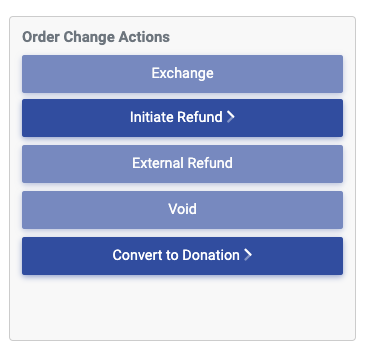
- Under Order Change Actions, click Convert to Donation. (see 1st screenshot below)
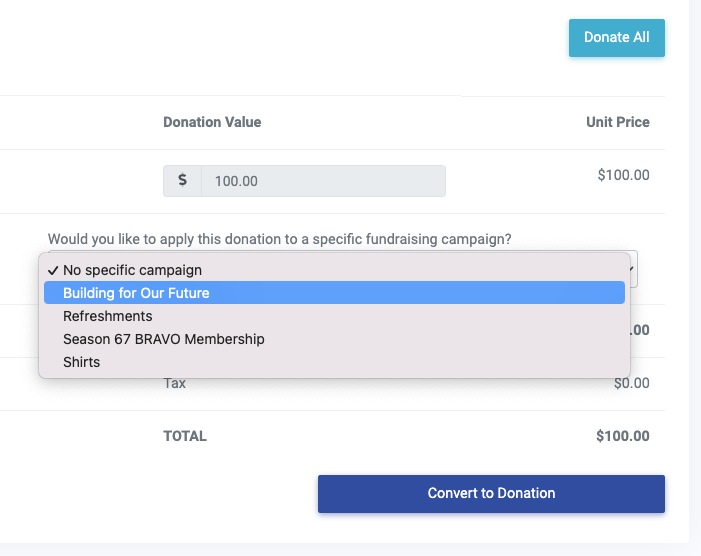
- Click "Donate All" near the top of the page
- Before processing the donation, you have the option to apply the donation to a specific fundraising campaign (when multiple fundraising campaigns exist). Choose the desired campaign if applicable. (see the second screenshot below)
- Click "Convert to Donation"
Upon completion of the above process:
- The balance for each converted ticket will be changed to $0.
- The customer will be credited for donating the tickets back to the venue.
- A donation for the value of the tickets will display on the patron record
- The donation will be applied to the selected fundraising campaign.
- A thank you email will go out to the customer thanking them for their donation.
View our video tutorials
Where can I see the total collected donations?
How do I make a donation request? Can I customize the donation wording?
Can my customers make a donation without buying a ticket?
How can I customize the email sent to customers who make a donation through an event?
Fundraising Campaigns and Donations now available on events
Targeted Donation Messaging and Recurring Donations
How do the round-up donations work?
