
Support Forum
Can I enter a donation given by a patron as the check date rather than the date received? - Sat - Oct 1, 2022 - 7:45am
Donations given by patrons can be recorded on a patron record after the donation has been given.
To backdate donations given by a customer, do the following:
- On the left-hand Menu, head to Patron Database > Search and Mass Mail.
- Enter the patron's last name and click Search Customers.
- Select their customer ID to view their patron record.
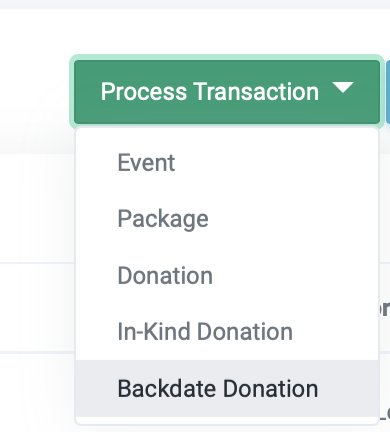
- Click the green Process Transaction button and choose Backdate Donation.
- Select the date and time the donation was made. Click Continue.
- You'll be taken to a list of your fundraising campaigns. Choose the desired campaign for which to allocate the donation.
- Enter the amount of the donation. The customer information will already populate on the checkout page.

The patrons' Giving Summary will update to reflect the donation received:

View our video tutorials
Where can I see the total collected donations?
How do I make a donation request? Can I customize the donation wording?
Can my customers make a donation without buying a ticket?
How can I customize the email sent to customers who make a donation through an event?
Fundraising Campaigns and Donations now available on events
Targeted Donation Messaging and Recurring Donations
How do the round-up donations work?
