
Support Forum
How do I add suggested donation amounts to my event? - Fri - Mar 21, 2025 - 5:41pm

To add suggested donation amounts to your event follow the steps below.
Please note that you must have donations enabled for your event for this feature to work.
Please note that you must have donations enabled for your event for this feature to work.
- Head to Event Manager > Donations > Click the gear cog icon next to Donations.
- When prompted click the 'Add Default Donation' button to add your suggested donation amount.
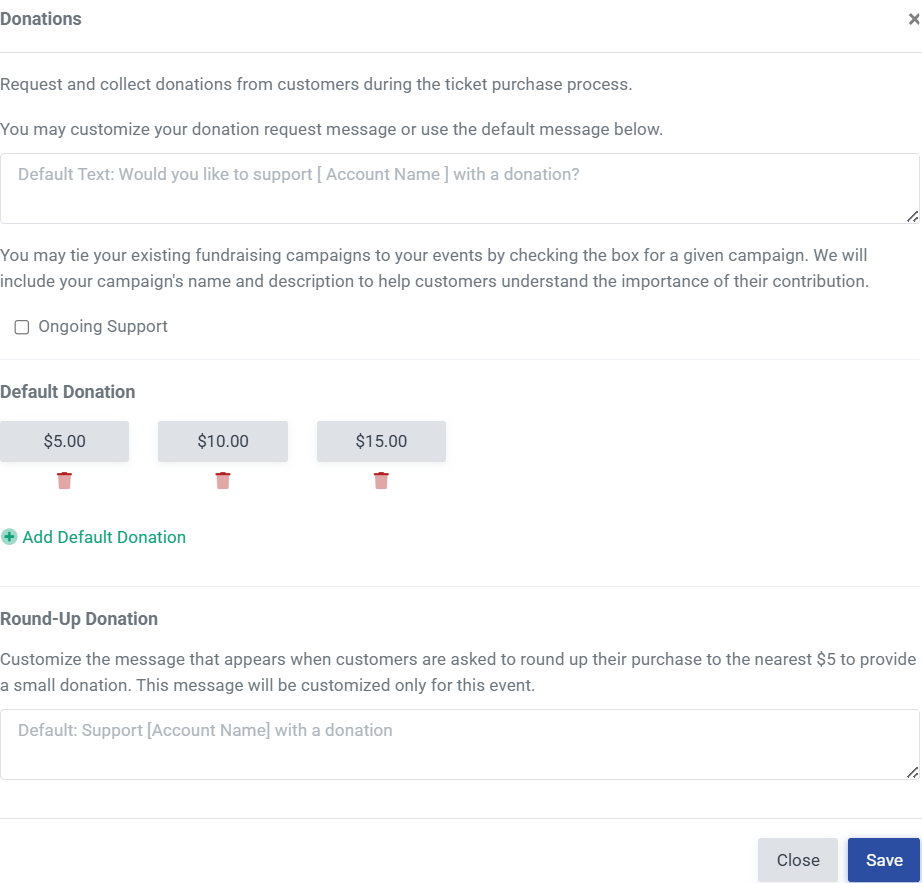
- Click Save to Save your Changes.

View our video tutorials
Where can I see the total collected donations?
How do I make a donation request? Can I customize the donation wording?
Can my customers make a donation without buying a ticket?
How can I customize the email sent to customers who make a donation through an event?
Fundraising Campaigns and Donations now available on events
Targeted Donation Messaging and Recurring Donations
How do the round-up donations work?
