Sat - Mar 14, 2026 - 9:18am
⚬
0 Comments
Customers
ThunderTix allows venue admins to block a patron from placing future orders when needed. This can be useful for handling chargebacks, disruptive behavior, fraudulent activity, or suspected ticket reselling.
What happens when a patron is blocked
When a customer is added to the block list, ThunderTix records their email address as blocked for your venue. If that customer tries to place another order, the system prevents the purchase.
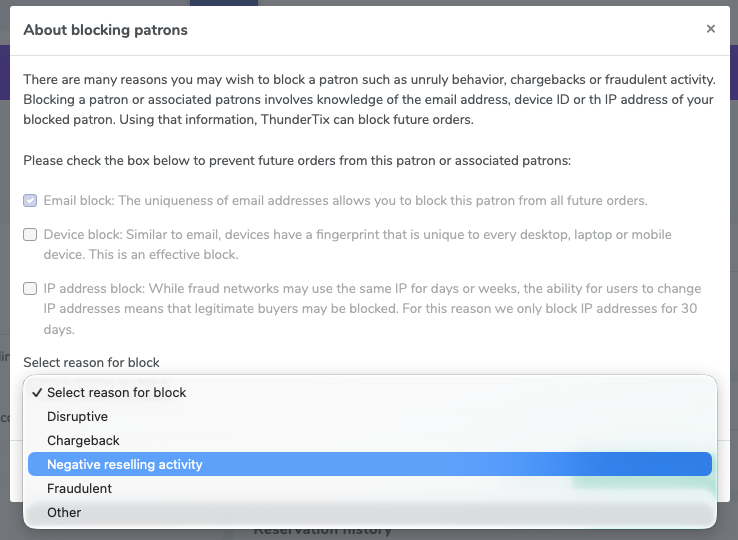
Depending on prior activity, ThunderTix may also use additional identifiers behind the scenes to help stop repeat attempts from the same user.
When to use the block list
You might choose to block a patron if they have:
Filed a chargeback
Been disruptive
Been involved in negative reselling activity
Shown signs of fraudulent behavior
Done something else that your team wants to document internally
How to add a patron to the block list
Open the customer’s record in ThunderTix.
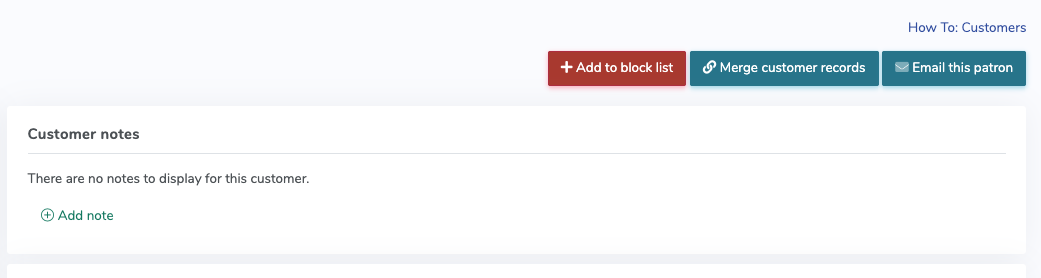
Select + Add to block list.
Choose the reason for the block.
If you select Other, enter an internal note explaining why the patron is being blocked.
Save your changes.
Once the patron has been blocked, the button will update from + Add to block list to - Remove from block list.
Add to block list - block fraudulent customers in ThunderTix
Available block reasons
When blocking a patron, you can choose from these reasons:
Disruptive
Chargeback
Negative reselling activity
Fraudulent
Other
If Other is selected, you can add a note for your internal records.
How to remove a patron from the block list
Open the customer’s record.
Select - Remove from block list.
Confirm that you want to remove the block.
After the block is removed, the patron can place orders again unless they are blocked later for new activity.
Things to keep in mind
Blocking a patron is venue-specific.
The block list is intended as an administrative fraud-prevention and account-management tool.
Notes and reasons are for your internal team and help document why a block was added.
If you use Stripe as your payment gateway, please follow the steps below to take additional action to block the customer directly in Stripe.

 ThunderTix allows venue admins to block a patron from placing future orders when needed. This can be useful for handling chargebacks, disruptive behavior, fraudulent activity, or suspected ticket reselling.
 Available block reasonsWhen blocking a patron, you can choose from these reasons: