
Support Forum
How can I remove the option for a minimum ticket price? - Mon - Oct 10, 2022 - 12:57pm
-
To remove the option for Pay What You Can (PWYC) pricing on a ticket, navigate to:
Events tab >
1. Click on the name of your event
2. Click Select then Tickets and Prices on the performance you'd like to change
3. Click the pencil icon under Actions to edit the ticket type
4. Uncheck the box for PWYC pricing
5. Click the disk under Actions to save the changes
If you have more than one performance, be sure to apply the changes to all performance dates by checking the box for Apply Prices To All Performances and clicking Apply Ticket Prices.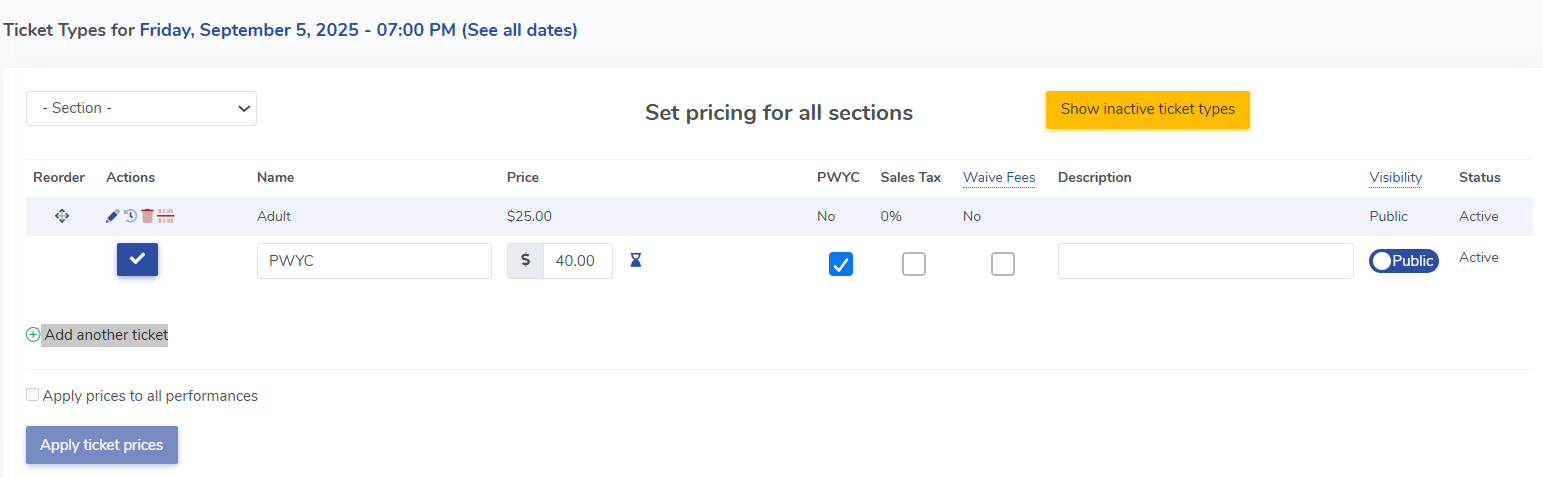

View our video tutorials
Can we collect extra information on an order?
How can I customize a tour date message for the public without making tickets available?
Is it possible to set the maximum number of seats but not change the current defaults?
Can I still sell tickets at the door using ThunderTix after I take my event offline or after it has expired?
Why is one of my event's dates showing as 'Sold Out'?
Is there a way you could show the PDF image we have uploaded just like the Event Image?
How can I make tickets available at box office only 1 hour before show time?
