
Support Forum
Can I Customize the Subject Line for Package Confirmation Emails? - Fri - Jan 16, 2026 - 12:24pm
-
 You now have the ability to set a custom subject line for your package confirmation emails, giving you more control over how your messages appear in patrons’ inboxes.
How it worksYou can add or update the email subject line for any package by following these steps:- Navigate to Events
- Select Package Manager
- Click on the name of your package
- Open the Ticket Delivery tab
- Under Email Subject, enter the subject line you’d like to use for that package
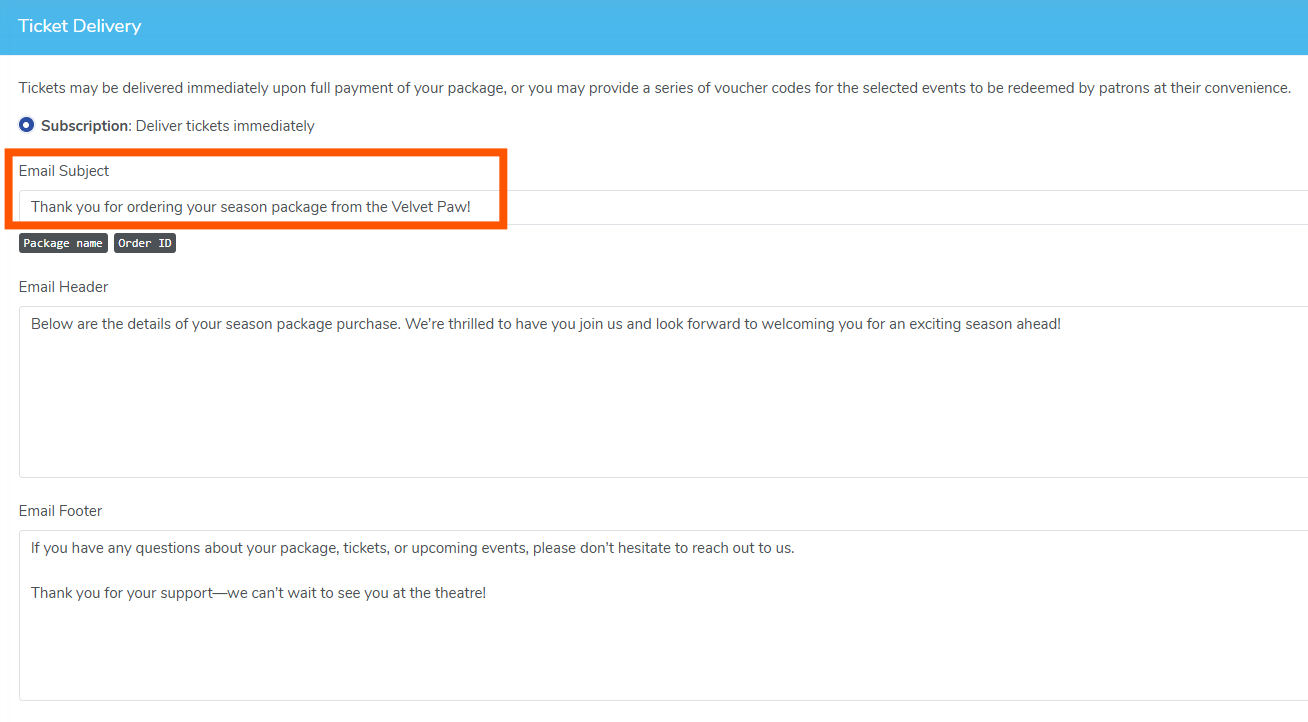
Once saved, this subject line will be used in the package confirmation email sent to patrons.
Creating a new package?
This option is also available when setting up new packages, allowing you to define the email subject from the start.
Why this is helpful
Custom subject lines allow you to:
- Clearly communicate what the email is about (subscriptions, flex passes, bundles, etc.)
- Improve email clarity and recognition for patrons
- Better align confirmation emails with your organization’s branding and tone
- Navigate to Events

View our video tutorials
What is the difference between Packages and Flex Passes?
Can I create a section in the seating chart that is available only to season ticket holders?
Does a subscriber get a ticket to each show?
Is it possible to do a report that shows the number of season ticket packages that were sold?
Can I create a Ticket package that includes both tickets and products?
Processing Subscription Renewals
How does a "Build Your Own" Package work?
