
Support Forum
Can I add a presale announcement to my package? - Thu - Jan 22, 2026 - 11:47am
-
 To add a pre-sale announcement to my package please follow the steps below:
- Head to Events > Package Manger > Create Package
- Fill out the Package Basics, Selection Method, Included Events, Ticket Delivery, and Pricing Tabs
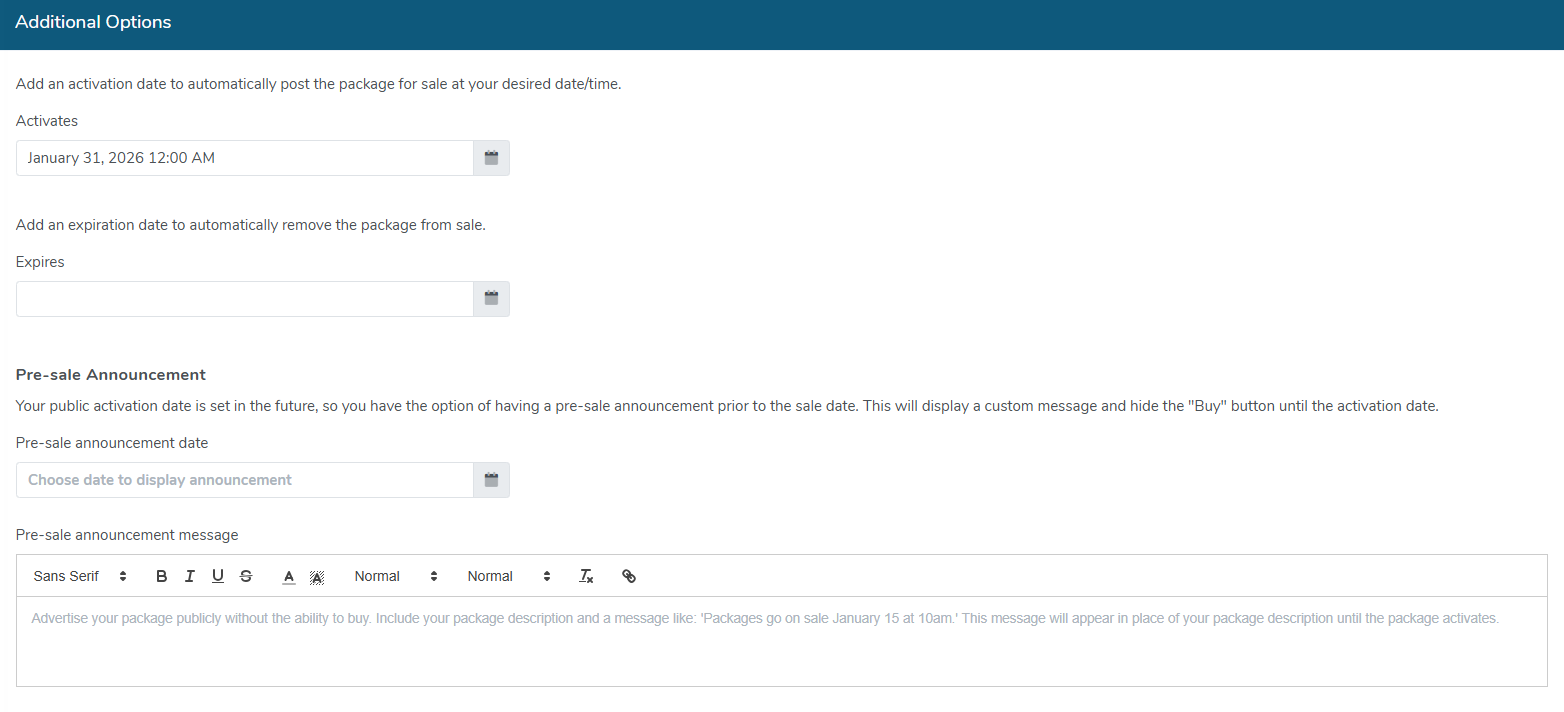
- When you get to the Additional Options tab, set your activation date for the date you want your package to go on sale
- When you enter your onsale date, enter in the date for your presale along with your presale message
- Optionally add in any shipping and fees for your package
- Click the Finish button to save your changes.
The presale function will work the same way it does for events. Once your package activates, the presale message will be removed and customers will be able to purchase the package.

View our video tutorials
What is the difference between Packages and Flex Passes?
Can I create a section in the seating chart that is available only to season ticket holders?
Does a subscriber get a ticket to each show?
Is it possible to do a report that shows the number of season ticket packages that were sold?
Can I create a Ticket package that includes both tickets and products?
Processing Subscription Renewals
How does a "Build Your Own" Package work?
