
Support Forum
Can I disable single seats on individual events? - Tue - Feb 17, 2026 - 11:55am
-
 Disabling single seats on a per-event basis prevents ticket selections that would leave isolated empty seats, helping venues maximize capacity and reduce unsold inventory. This is typically used for high-demand or reserved seating events where tighter control over seating is needed. The system blocks purchases that would create single-seat gaps while allowing the setting to be applied only to specific events
To disable single seats on a specific performance follow the instructions below:- Head to Events > Event Manager > Click on the name of your event
- Locate the 'Singles' column (Inbetween Capacity and Access)
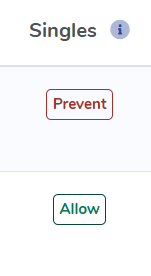
- You can click 'Prevent' to prevent single seats from being left on your chart or 'Allow' to allow single seats to be left open on your chart
Important note: We will follow the 'Single seat prevention' logic set for your event. So if you have 'Prevent any single seat from being empty' enabled, no single seats will be left open on your chart. Alternatively, if you have 'the Prevent empty single seats in the middle of a row, but allow empty single seats on the aisle' setting enabled, customers can leave a seat open on the aisle but not in the middle of a row.
View our video tutorials
Why are my numbered seats not in order?
How can I add a wheelchair seat to my seating chart?
Where & How do I create a seating chart for reserved seating?
How do I assign different pricing to each section of my seating chart?
Where can I select our seating chart to a new event I created?
How can I share what seats are sold in our seating chart?
What is the difference between block and reserve for seats?
