
Support Forum
Introducing CFAR: Turn Cancellations Into Revenue - Tue - Jun 30, 2026 - 7:02am

We’re excited to roll out Flexible Ticket Upgrade, our Cancel For Any Reason (CFAR) add-on. Patrons can pay a 10% upgrade fee at checkout for the option to cancel eligible tickets before the deadline you set and receive gift card credit for the ticket value.
Why it's a win for your venue:
- More revenue: patrons pay an upgrade fee of 10% for the flexibility, increasing your average order value
- Less support burden: no more case-by-case refund requests or "can you make an exception" emails
- Fully automated: no claims process, no documentation, no manual review required from your team
Why it's a win for your patrons:
- Peace of mind knowing plans can change without losing their money
- A simple way to cancel and rebook for a different show or date
- No need to justify why they're cancelling
How it works:
- You set the rules: choose the cutoff window (in hours) before the event when cancellation is allowed
- Patrons opt in at checkout: they can add the Flexible Ticket Upgrade for a small fee when purchasing tickets
- They cancel anytime before the cutoff: no reason needed, no forms to fill out
- They receive a gift card: instantly issued for the eligible ticket value plus ticket tax, ready to use on a future purchase
- You keep 65% of the upgrade fee while the patron receives gift card credit for eligible canceled tickets, reducing manual refund requests and support back-and-forth
This new, optional add-on that puts flexibility in your patrons' hands while putting extra revenue (and fewer support tickets) in yours.
How to set it up for existing events:
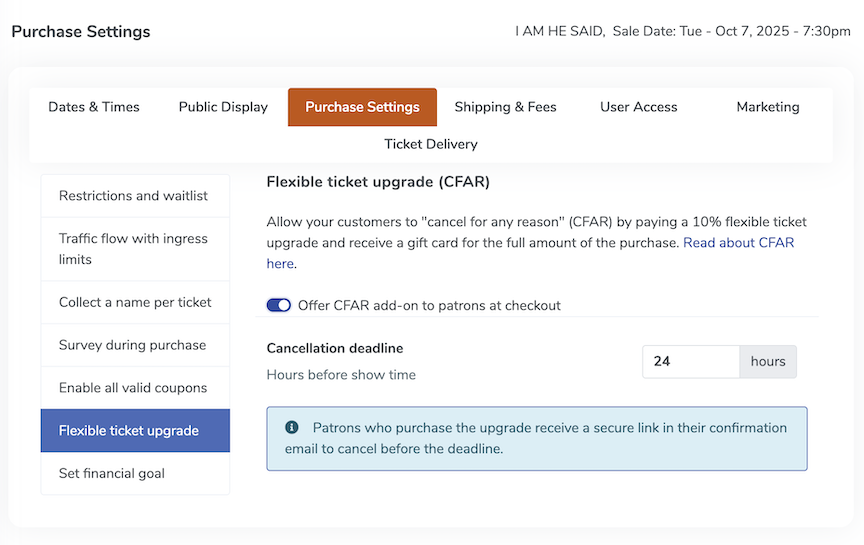
- Go to Manage your event
- Open the Purchase settings top navigation tab
- Select Flexible Ticket Upgrade from the left tab
- Toggle Offer CFAR add-on to patrons at checkout
- Set your cancellation deadline
- Save your changes and start selling tickets
How to set up CFAR for new events:
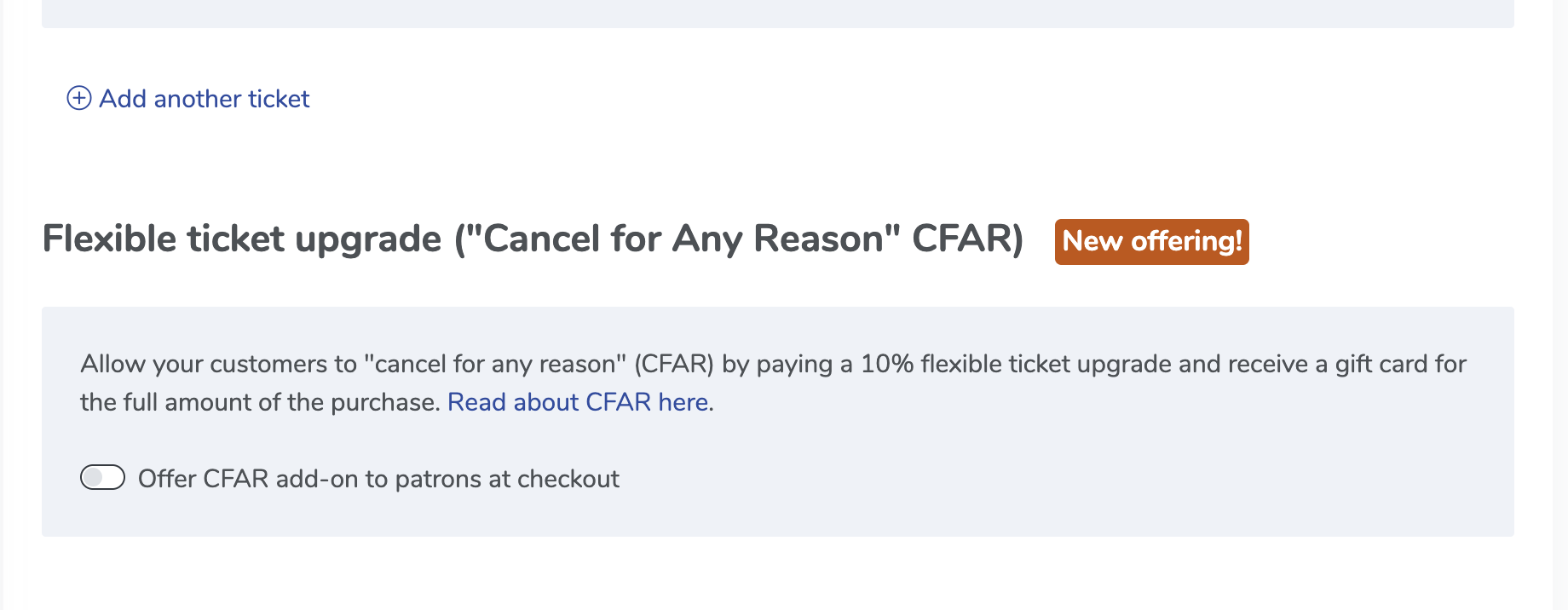
1. Click "Create event" on the events page
2. After you've filled in your event details in the Event Basics section, you will see Flexible ticket upgrade ("Cancel for Any Reason" CFAR)
3. Toggle "Offer CFAR add-on to patrons at checkout" and set your Cancellation deadline

View our video tutorials
Is it possible to set a time to stop ticket sales for each individual performance before the show?
Why are my shows not listed in chronological order?
Can I change the display of the event's date to my buyers?
How can I change an event date or time after I've created it?
Is there a way to delete the ticket type on a recurring event just for one day's tour?
Where do I change my address in ThunderTix?
What if my event expired too early? How can I get it back online for customers?