
Support Forum
Can I give users permission to process refunds? - Wed - Apr 10, 2024 - 5:32pm
-
 If you do not want every user in your organization to be able to process refunds, you now have the ability to choose who can process refunds.
Head to the Users tab under Account Settings. Click on the user that you would like to give/remove the permission for. Under 'Specified Permissions' you should see an option for 'Process Refunds'. Simply toggle that permission to yes or no.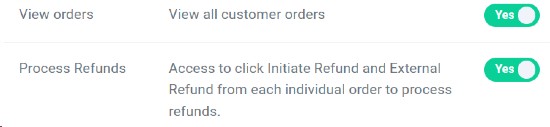
When you enable the process refunds permission, it will automatically give the user permission to view orders. All existing users that had access to view orders previously had access to process refunds.

View our video tutorials
How can I delete a user?
How can I track sales by person?
How can I change my password?
Does each user need their own login to scan tickets?
How can I check my saved password in my browser to see if it's right?
How can I create a new user?
How can I see a list of inactive users?
