
Support Forum
How can I allow event-restricted users to view fundraising campaigns associated with their assigned events? - Mon - Jan 6, 2025 - 4:06pm
-
 To allow event-restricted users to view fundraising campaigns associated with their assigned events:
1. Head to Account Settings > Users
2. Select the user you want to enable the permission before.
2. On the 'Event Restricted' tab, locate the View fundraising campaigns for assigned events permission
4. Toggle the 'Enable' option to 'Yes'.
5. Click 'Update' to save your changes.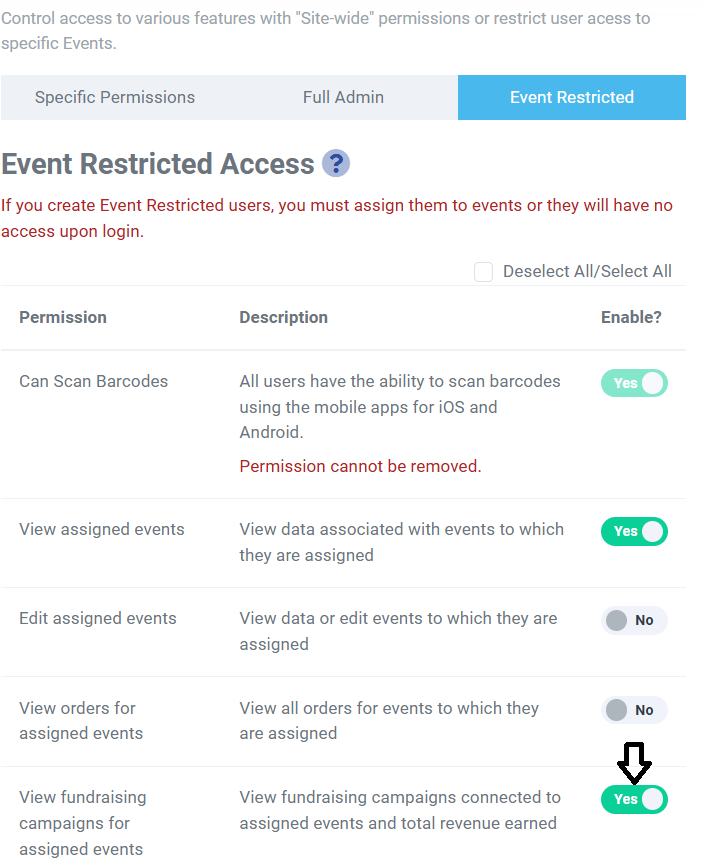
The user can only view the campaigns that are connected to their assigned events. They can also see the Total Revenue Earned on a campaign, but are not able to view reports or process donations.

View our video tutorials
How can I delete a user?
How can I track sales by person?
How can I change my password?
Does each user need their own login to scan tickets?
How can I check my saved password in my browser to see if it's right?
How can I create a new user?
How can I see a list of inactive users?
