Support Forum
How can I display a link on my public page for people to sign up to volunteer? - Thu - Jun 26, 2025 - 5:03pm
-
To display a link on your public page for people to sign up to volunteer head to Public display settings > Edit Public Display.

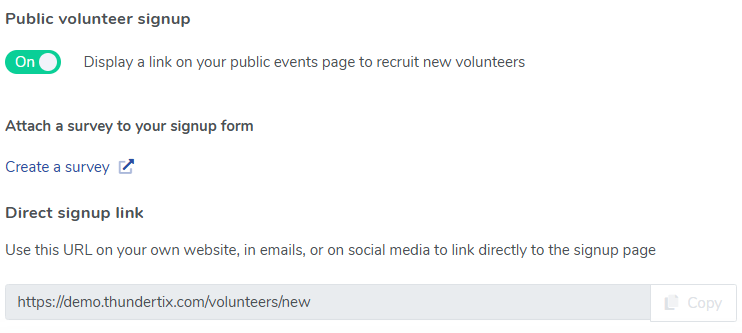
On the right hand side underneath Automatic inactivation for performances you should see Public volunteer sign up (pictured above). Toggle the 'Display a link on your public events page to recruit new volunteers' to 'Yes'. You also have the option to attach a survey to the volunteer sign up process.
We've included a direct sign up link as well so that you can use the URL for your own website, in emails or social media.
Once enabled the volunteer link will be at the bottom of your ThunderTix page (pictured below).


View our video tutorials
How can I make an existing user a Volunteer?
How do I create a role for my volunteers?
How do I assign a volunteer to a role?
How do I create or assign volunteer opportunities for my event?
Registration process for volunteers
How can my volunteers sign up for opportunities?
Where can I see total hours volunteers have worked?