
Support Forum
Can I change or modify a volunteer's hours? - Thu - Sep 18, 2025 - 4:30pm

Tracking volunteer hours is a great way to save time and avoid manual recordkeeping! But what happens if a volunteer signs up for certain hours and ends up working more (or less) than expected?
To adjust volunteer hours- even after the shift is complete, follow the steps below:
- Go to Volunteer Manager > Volunteers. Click on the volunteer that needs their hours adjusted.
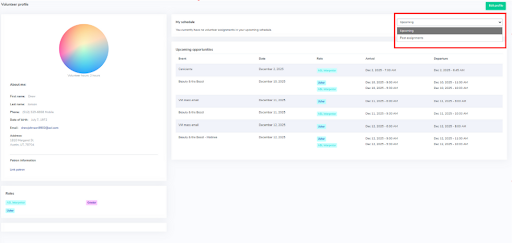
- Then, click on the box to the top right of the screen and click “Past Assignments”. Here, you will be able to see the past hours that they worked.
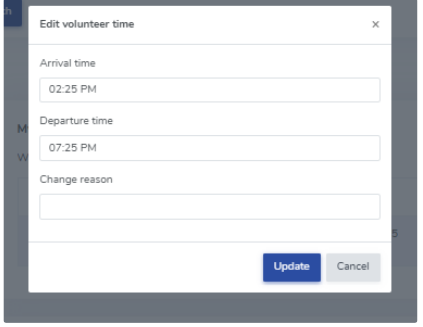
- Once you are looking at the previous hours worked by your volunteer, you can click “Modify” , which will allow you to update the arrival time and departure time of your volunteer. You can also enter in the reason for changing the volunteer's hours.
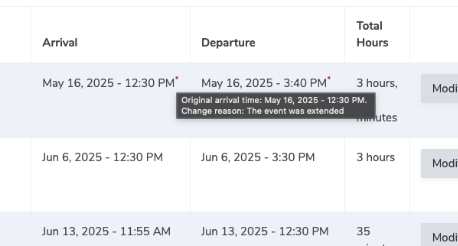
- Once updated, you will be able to see the updated arrival time and departure time. An asterix will show next to the arrival time and departure time. If you hover over it, you will be able to see what edits were made.
View our video tutorials
How can I make an existing user a Volunteer?
How do I create a role for my volunteers?
How do I assign a volunteer to a role?
How do I create or assign volunteer opportunities for my event?
Registration process for volunteers
How can my volunteers sign up for opportunities?
Where can I see total hours volunteers have worked?
