
Support Forum
How can I block multiple seats on my seating chart? - Thu - Feb 12, 2026 - 11:19am
-
 To block multiple seats on your seating chart, please follow the steps below:
- Head to Events > Event Manager > Sell
- Click and drag your mouse/cursor over the seats you wish to block
- Right click on the seats
- Select the specific type of block (General, House Seats, Press, etc.)
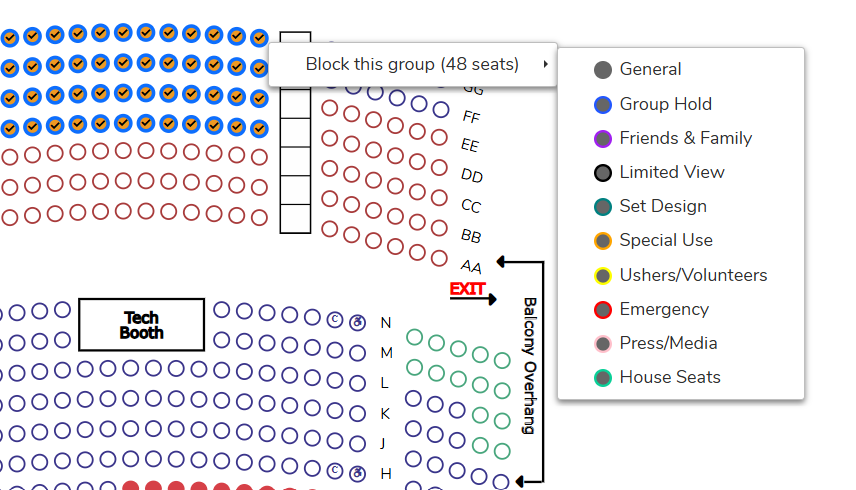
5. When you click out of the screen, the seats will show as blocked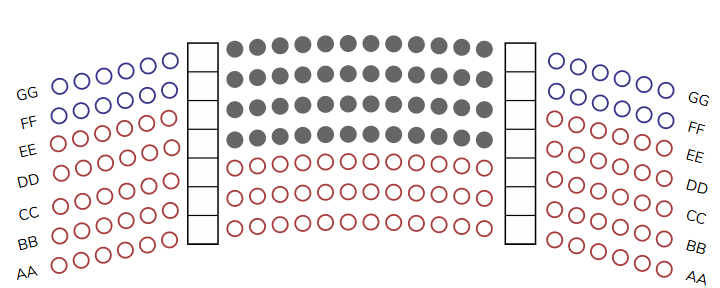
View our video tutorials
Why are my numbered seats not in order?
How can I add a wheelchair seat to my seating chart?
Where & How do I create a seating chart for reserved seating?
How do I assign different pricing to each section of my seating chart?
Where can I select our seating chart to a new event I created?
How can I share what seats are sold in our seating chart?
What is the difference between block and reserve for seats?
