Certifications let you keep track of what each volunteer is trained or cleared to do, like usher training, box office training, or a yearly background check. Once you add them, you can quickly find the right people when you staff an event.
This article covers:
Creating your certifications
Adding a certification to a volunteer
Finding volunteers by certification
Exporting your volunteer list
How do I create volunteer certifications?
Start by building your list of certifications. You only need to do this once, and every volunteer can then be given any certification on the list.
Go to Volunteer Management > Certifications.
Click to add a new certification.
Enter a name, like "Annual Background Check."
Add a short description if you'd like.
Choose when it expires:
Never, for things like a one-time training.
A number of months after the issue date, like 12 for a yearly background check.
Click Save.
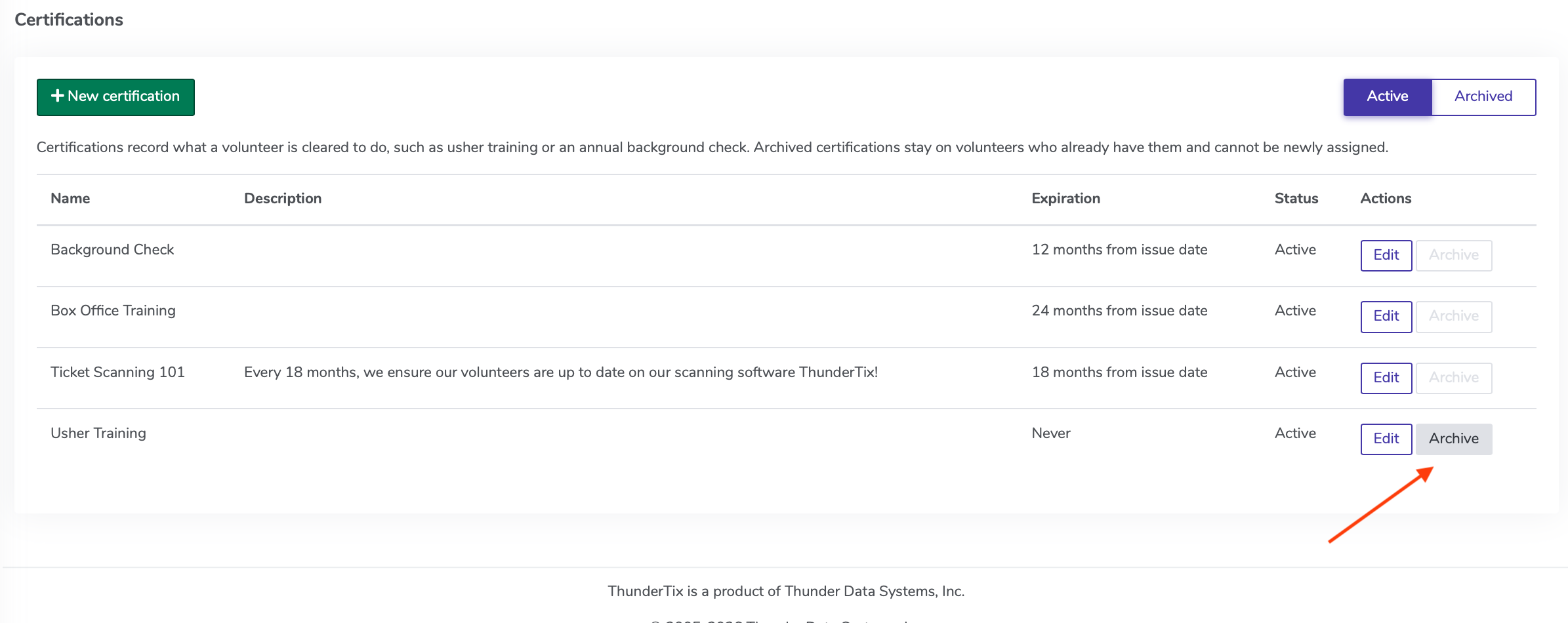
Below: The main Certifications page, and how to get to it (Volunteer Manager > Certifications)
You can change a certification's name, description, or expiration rule at any time. If you change how long it lasts, ThunderTix updates the expiration dates for volunteers who already have it. A date that was typed in by hand stays the same.
Archiving a certification
Archive a certification when you no longer use it. Volunteers who already have it keep it on their profile, but it can't be given to anyone new.
Below: How to Archive a certification, via the Archive button under Actions. You can see Archived certifications by switching to the 'Archived' toggle on the top right of the Certifications page.
Your spreadsheet will match what you see on the screen, including the Certifications column with names and expiration dates.
Need a list of who signed up for one performance instead? Go to Events > Event Manager, click your event, and under Reports choose Export volunteer signups.
Good to know
Only admins can add or see certifications. Volunteers won't see them on their own profile.
Certifications don't control who can sign up for a role. Any volunteer can still register as they do today.